How Indian Schools Can Implement WhatsApp CRM in Under 30 Days
In this article
This is the article you bookmark and follow. Over the past 62 articles in this blog, we have covered every aspect of WhatsApp-based school management: from [fee tracking](/blog/track-school-fee-payments-whatsapp) to [safety alerts](/blog/detect-child-safety-concerns-whatsapp-school), from [parent engagement scoring](/blog/parent-engagement-score-school-india) to [teacher dashboard design](/blog/class-teacher-dashboard-full-visibility), from [POCSO compliance](/blog/pocso-compliance-schools-ai-detection) to [admission pipeline management](/blog/school-admission-season-playbook-india). Each article addressed a specific capability. This article ties them all together into a single, actionable 30-day implementation plan. By Day 30, your school will have Chatmadi fully operational: all classes configured, all teachers uploading conversations, all dashboards showing live data, and your first analytics review completed. This is not a theoretical framework. It is a project plan you can print and follow, day by day, until your school's WhatsApp intelligence is live.
Why Most School Software Implementations Fail (And How This Guide Is Different)
Most school software implementations fail because they are open-ended. There is no deadline, no daily plan, and no clear definition of "done." Teachers are told to "start using it" without specific actions for specific days. The result is that adoption drifts, some teachers engage while others do not, and within two months the tool is used by 30% of staff while 70% have reverted to their old methods. This guide is different because it has a fixed timeline (30 days), specific daily actions (especially in Week 1), weekly milestones that are measurable, and a clear definition of success at Day 30. The 30-day timeline is not arbitrary. It is based on what works: one week for setup, one week for first intelligence, one week for full team adoption, and one week for optimisation. Schools that follow this timeline consistently achieve full adoption. Schools that take an open-ended approach rarely do. If you have not yet signed up for Chatmadi, visit chatmadi.com and create your free account before reading further. This guide assumes you have a login and are ready to begin.
Your 30-Day Chatmadi Implementation: An Overview
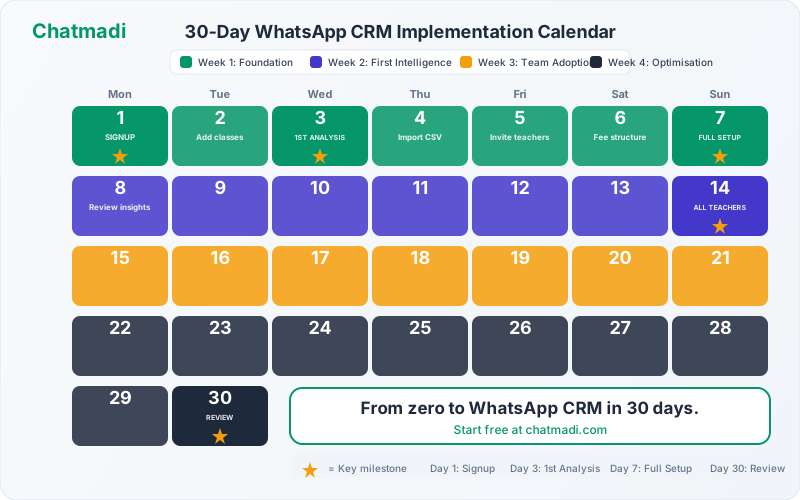
The 30 days are divided into four phases. Week 1 (Days 1 to 7): Foundation Setup. You will create your school workspace, add classes, import students, invite initial staff, and upload your first WhatsApp conversations. By Day 7, your school is fully configured in Chatmadi and you have seen your first AI analysis results. Week 2 (Days 8 to 14): First Intelligence. All class teachers upload their first conversations. Dashboards begin showing real data. Fee detection identifies first payments. Attendance patterns start emerging. By Day 14, every teacher has experienced the dashboard and seen the value firsthand. Week 3 (Days 15 to 21): Full Team Adoption. Teachers build the daily dashboard habit. The principal begins using school-wide analytics. Safety alerts are configured and tested. The [PTM module](/blog/ptm-planning-indian-schools-high-attendance) is set up for the next meeting. By Day 21, Chatmadi is part of the school's daily operations. Week 4 (Days 22 to 30): Optimisation and Embedding. Refine workflows based on two weeks of experience. Set up the [fee reminder strategy](/blog/fee-reminders-parents-whatsapp-school). Configure the [weekly digest](/blog/weekly-school-digest-ai-automation). Run the first full analytics review. By Day 30, the implementation is complete and self-sustaining.
Week 1: Foundation Setup (Days 1-7, Day-by-Day Breakdown)
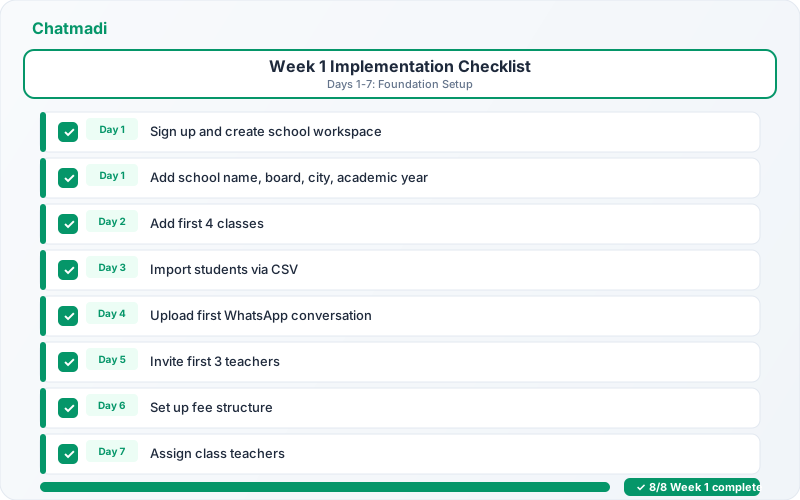
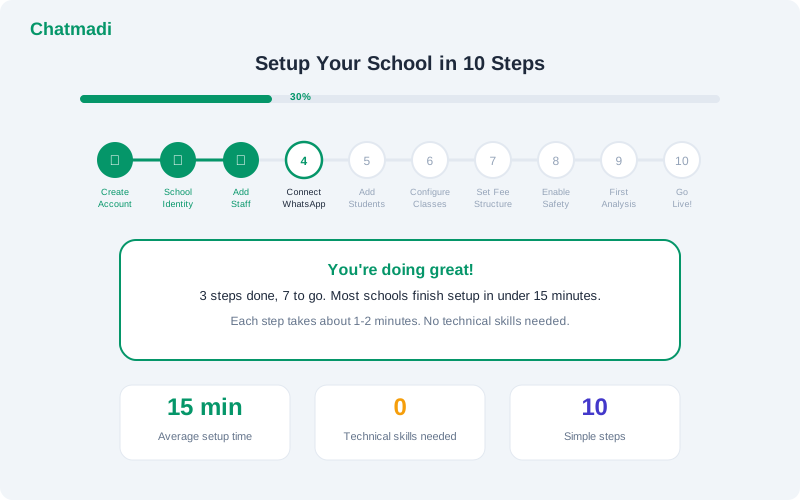
Day 1: Sign up and create your school workspace. Enter your school name, select your board (CBSE, ICSE, State Board, or Other), enter your city, and set the academic year. Upload your school logo. Declare your role as principal or administrator. This follows the [setup guide](/blog/setup-school-on-chatmadi-guide) exactly. Time required: 15 minutes. Day 2: Create your class structure. Add every class and section in your school. For a school with 8 classes and 2 sections each, this means 16 entries. Use consistent naming: Class 1A, Class 1B, Class 2A, and so on. Time required: 10 minutes. Day 3: Import students. Prepare a CSV file with student names, class assignments, and parent contact details (parent name and phone number). Upload it using the bulk import feature. Alternatively, add students manually for smaller classes. Time required: 20 to 40 minutes depending on school size. Day 4: Upload your first WhatsApp conversation. Choose the class where you have the most active parent WhatsApp group. Export the conversation from WhatsApp (three taps: group settings, export chat, without media). Upload it to Chatmadi. Watch the AI analyse the messages. Review the extracted signals on your dashboard. This is the moment Chatmadi comes alive. Time required: 10 minutes. Day 5: Invite your first teachers. Add three to five staff members: the class teachers of your most active classes. Send them invitation emails. Walk them through the dashboard for one class that already has data from your Day 4 upload. Time required: 20 minutes. Day 6: Set up fee structures. Enter the fee amounts and instalment due dates for each class. This allows the [fee detection system](/blog/reduce-fee-collection-time-whatsapp-intelligence) to match payment mentions against correct amounts. Time required: 15 minutes. Day 7: Assign class teachers and review. Link each class to its class teacher in the system. Review the Week 1 checklist. By now you should have: school identity configured, all classes created, students imported, first conversation analysed, initial staff invited, and fee structures set. Time required: 15 minutes.
Week 1 implementation checklist showing 8 daily tasks all completed with progress bar at 100 percent
Week 2: First Intelligence (Days 8-14)
The goal of Week 2 is to get every class teacher uploading their first conversation and experiencing the dashboard with their own class data. Day 8 to 9: hold a staff orientation session. Follow the [teacher training framework](/blog/train-teachers-ai-school-management-tools): 45 minutes covering why, what, what-not, live demo, and hands-on practice. Every teacher exports one conversation and uploads it during the session. Day 10 to 11: supervised daily uploads. Each teacher uploads one conversation per day. The principal or admin coordinator checks the adoption dashboard to confirm all teachers are uploading. Provide individual support to any teacher who is struggling with the export or upload process. Day 12 to 13: first dashboard review. Ask each teacher to spend 10 minutes reviewing their dashboard. What attendance data has been detected? What homework acknowledgements are showing? Are there any signals the teacher did not expect? Collect feedback on what is surprising and what is useful. Day 14: milestone check. By Day 14, the following should be true: every class teacher has uploaded at least two conversations, every class dashboard shows attendance and homework data, the school-wide dashboard shows aggregate metrics, and every teacher has expressed at least one "I did not know that" insight from the data. If any of these are not true, address the gaps before moving to Week 3.
Week 3: Full Team Adoption (Days 15-21)
The goal of Week 3 is to transition from supervised use to habitual use. The daily dashboard check should become as automatic as checking WhatsApp itself. Day 15 to 17: establish the morning routine. Each teacher begins the day by checking their Chatmadi dashboard before the first class. The [10-minute daily routine](/blog/class-teacher-dashboard-full-visibility) covers attendance, homework, alerts, and actions. The principal checks the school-wide dashboard each morning in 5 minutes. Day 18 to 19: configure safety and engagement features. Enable [safety alerts](/blog/detect-child-safety-concerns-whatsapp-school) and designate escalation contacts. Review the [parent engagement scores](/blog/parent-engagement-score-school-india) that have accumulated over two weeks of data. Identify any families in the Low or At Risk tiers and discuss outreach with the relevant class teachers. Day 20: set up the PTM module. If a PTM is coming up, create it in Chatmadi and send the RSVP notification to the class group. If no PTM is imminent, set up the module for the next scheduled meeting. Day 21: Week 3 review. By Day 21, the following should be true: all teachers check their dashboard daily without reminders, safety alerts are configured and tested, engagement scores are visible for all students, and the principal is using the school-wide dashboard for operational decisions.
Week 4: Optimisation and Embedding (Days 22-30)
The goal of Week 4 is to move from "using Chatmadi" to "running the school with Chatmadi." Day 22 to 24: optimise communication workflows. Set up the fee reminder strategy with three stages: pre-due-date gentle reminder, post-due-date standard reminder, and two-week overdue personal outreach, as described in the [fee reminder guide](/blog/fee-reminders-parents-whatsapp-school). Configure the weekly digest so each teacher receives a Monday morning summary. Review the [automation policy](/blog/automate-school-communication-human-touch) to ensure the right balance of AI and human communication. Day 25 to 27: run the first analytics review. With nearly four weeks of data, the analytics are meaningful. Review the [six analytics tabs](/blog/school-analytics-better-decisions-principal): Overview, Admissions, Fees, Academics, Engagement, and Safety. Note the key metrics, trends, and any patterns that need attention. Prepare a brief summary for the next staff meeting. Day 28 to 29: address gaps and refine. Review the adoption dashboard. Are all teachers uploading consistently? If any teacher has fallen off, provide individual support. Review the data quality: are student profiles complete? Are parent contacts accurate? Fix any gaps. Day 30: celebrate and plan forward. The implementation is complete. Run a brief staff meeting to share the results: how many conversations have been analysed, how much time has been saved, what insights have been discovered. Share the [30-day results summary](/blog/implement-whatsapp-crm-school-30-days) with the staff and the school board. Set goals for the next quarter.
How-To: What to Do on Day 31 to Sustain Your Chatmadi Implementation
Day 31 is the first day of sustained operations. The implementation project is over. Now Chatmadi is simply how your school runs. Three things must happen to sustain the implementation. First, maintain the upload cadence. Teachers should upload conversations at least twice per week. If using the WhatsApp Business API, this happens automatically. If using manual uploads, build it into the weekly routine. Second, review analytics weekly. The principal's Monday morning dashboard review should become a permanent habit. The [weekly data review](/blog/school-analytics-better-decisions-principal) takes 15 to 20 minutes and produces specific actions. Third, onboard new staff. When new teachers join, include Chatmadi training in their orientation. The [teacher onboarding framework](/blog/train-teachers-ai-school-management-tools) works for individual onboarding as well as group sessions.
Measuring Success: What 30 Days of Chatmadi Data Looks Like
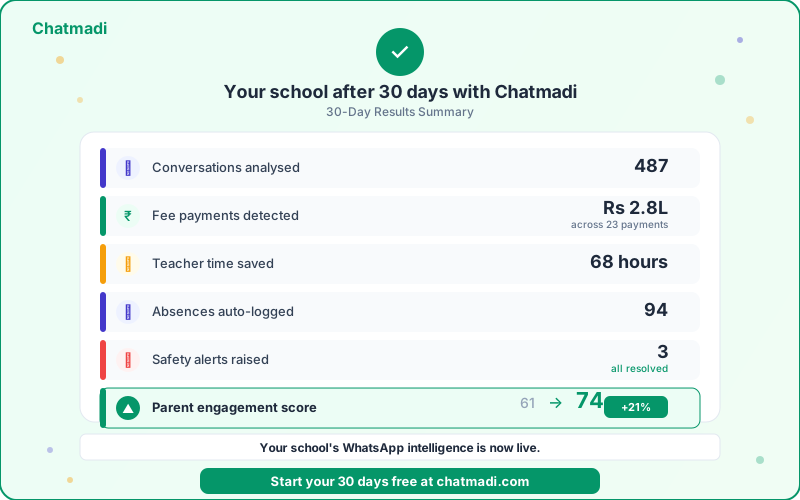
After 30 days of consistent use, a typical school with 100 to 200 students will have the following data in Chatmadi. Conversations analysed: 400 to 600 conversations uploaded across all classes, containing thousands of individual messages. Fee payments detected: 15 to 30 fee payment mentions identified from WhatsApp conversations, representing lakhs of rupees in tracked collections. Teacher time saved: 50 to 80 hours of combined teacher time saved across all staff, based on the [time savings analysis](/blog/reduce-teacher-workload-ai-school) of 2 or more hours saved per teacher per day. Absences auto-logged: 60 to 120 student absences detected and recorded from parent WhatsApp notifications, as described in the [attendance tracking guide](/blog/track-student-attendance-whatsapp-school). Safety alerts raised: 1 to 5 safety-related signals detected and escalated, depending on the school's communication volume and the nature of the conversations. Parent engagement scores: every family now has a composite engagement score based on four dimensions: fee timeliness, PTM attendance, [homework acknowledgement](/blog/track-parent-homework-acknowledgements-school), and communication frequency. Homework acknowledgement rate: a school-wide average acknowledgement rate is now visible, with class-level and subject-level breakdowns. At-risk students identified: the system may have flagged 2 to 6 students showing simultaneous declines in attendance, engagement, and homework participation. These numbers are not projections. They are what schools consistently report after 30 days of Chatmadi use. The data exists because the conversations existed. Chatmadi simply read them and turned them into structured intelligence that the school can act on.
Thirty day results summary showing conversations analysed fee payments detected teacher time saved and engagement score improvement
Frequently Asked Questions
Can I complete the implementation in less than 30 days?
Yes. Schools with tech-savvy staff and strong principal involvement have completed the implementation in as few as 14 days. The 30-day timeline is designed to be comfortable for any school, including those with limited technical capacity.
What if I cannot get all teachers onboarded by Day 14?
Focus on the willing teachers first. Get 60 to 70% of teachers onboarded by Day 14 and use Week 3 to bring the remaining teachers on board. Peer influence from early adopters is the most effective tool for late adopters.
Do I need to upload conversations every day?
During the first two weeks, daily uploads produce the fastest results. After that, twice-weekly uploads are sufficient for most schools. Schools using the WhatsApp Business API get automatic real-time processing.
What if the AI makes mistakes in the first few days?
Early mistakes are expected as the system learns your school's communication patterns. Teachers can correct any incorrect detection on the dashboard. Accuracy improves rapidly within the first two weeks.
Is this implementation plan suitable for schools of all sizes?
Yes. The plan works for schools with 30 students and schools with 500 students. The daily actions are the same regardless of school size. Larger schools may need more time for student data import on Day 3 and more coordination for teacher onboarding in Week 2.
---
Sixty-three articles. One platform. One goal: making Indian schools smarter through WhatsApp intelligence. Your 30-day journey starts now. Start free at chatmadi.com
Tagsschool productivity tools India 2025WhatsApp CRM for schoolsschool WhatsApp management software Indiaschool admin software India freeChatmadi
C
Chatmadi Team
School Communication Intelligence
The Chatmadi team writes about AI-powered parent communication, school management best practices, and WhatsApp intelligence for Indian schools. Built by Eduloom Technologies OPC Pvt Ltd, Mysore.