PTM Planning for Indian Schools: How to Get 80%+ Parent Attendance
In this article
The parent-teacher meeting is the single most important touchpoint between a school and its parents. Yet the average PTM at an Indian school achieves only 50 to 60% parent attendance. Of the parents who attend, fewer than half receive specific, actionable feedback about their child. Of the action items discussed during the meeting, fewer than 30% are followed up on before the next PTM. The meeting happens, parents come and go, and very little changes. PTM management software school India schools need must address all three problems: getting parents to attend, making the meeting productive, and ensuring follow-through on what was discussed. Chatmadi manages the complete PTM lifecycle from scheduling to follow-up.
The Indian School PTM Problem: Why 40% of Parents Don't Come
Parent-teacher meetings in Indian schools face structural challenges that reduce attendance. The first challenge is scheduling. Most schools schedule PTMs on working days, typically Saturdays, without considering that many parents in urban areas work six-day weeks or have Saturday commitments. The second challenge is communication. PTM announcements are often sent as a single message in the class group: "PTM on Saturday 15th March. Please attend." There is no RSVP mechanism, no confirmation, no reminder. Parents who read the message on Monday may forget by Saturday. Parents who did not see the message in the group scroll never knew about it. The third challenge is perceived value. Many parents attend one PTM and find that the feedback is generic: "Your child is doing well" or "Your child needs to study more." Without specific, data-backed feedback, parents conclude that PTMs are not worth the time investment and skip subsequent ones. The fourth challenge is logistics. For schools that run PTMs as open sessions (all parents arrive during a window), parents face long wait times. A parent who takes a half day off work and then waits 45 minutes to speak with a teacher for 5 minutes will not return for the next PTM. Each of these challenges is addressable. Chatmadi's PTM module addresses all four by providing structured scheduling, automated RSVP tracking, data-prepared talking points, and time-slot management.
The 6-Stage PTM Lifecycle Every School Should Follow
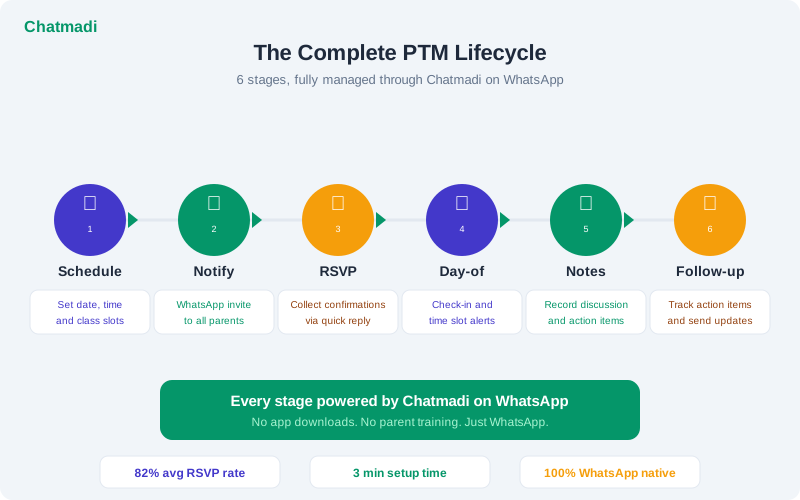
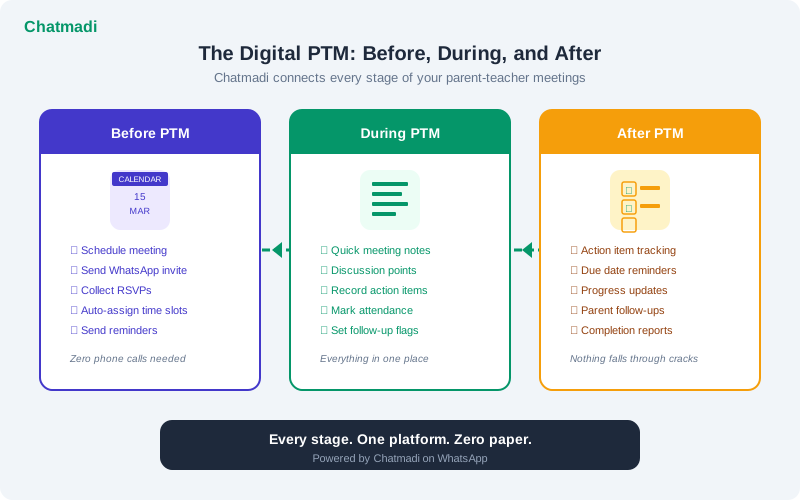
An effective PTM is not a single event. It is a six-stage process. Stage one: scheduling. The class teacher or principal sets the PTM date, time window, and class at least two weeks in advance. Adequate lead time is essential for working parents who need to arrange time off. Stage two: notification and RSVP. Parents receive a personalised notification via WhatsApp with the PTM details and a clear request to confirm or decline attendance. The notification should include the specific date, time, location, and what will be discussed. Stage three: RSVP tracking and follow-up. As parents confirm or decline, the school tracks responses. Parents who have not responded within 5 days receive a follow-up reminder. The goal is to achieve 80% or higher RSVP rate before the PTM date. Stage four: day-of attendance. On the day of the PTM, the teacher marks which parents actually attended. This is distinct from RSVP tracking because some parents confirm but do not attend, and some attend without confirming. Stage five: meeting notes. During or immediately after each parent meeting, the teacher records key discussion points, concerns raised, and action items agreed upon. These notes are linked to the student's record. Stage six: follow-up. Action items from the PTM are tracked with due dates and responsible parties. Before the next PTM, the teacher reviews outstanding action items and follows up with parents. This creates accountability and demonstrates to parents that what they discuss in the meeting actually leads to action.
How Chatmadi Manages the Complete PTM Lifecycle
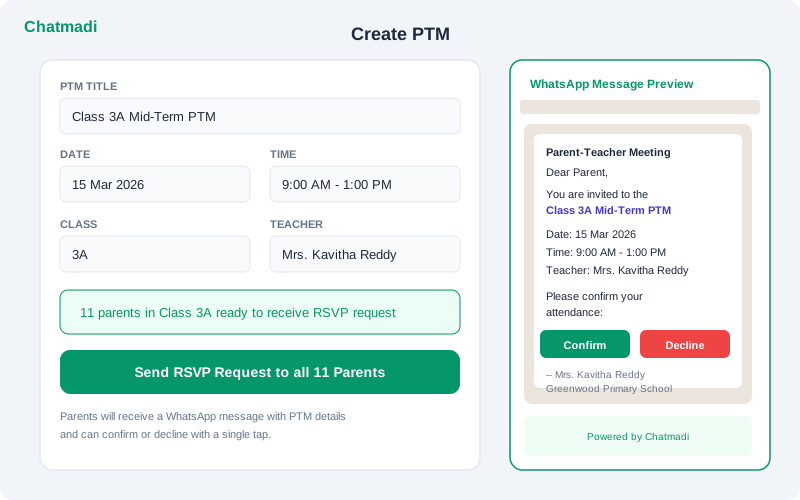
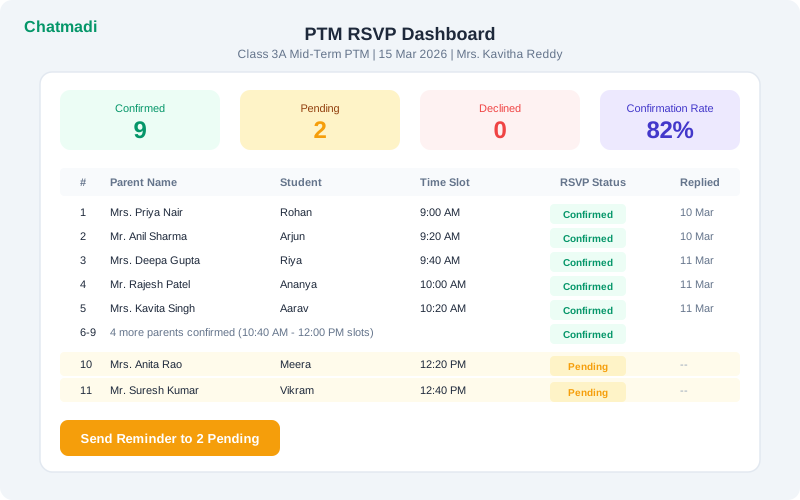
Chatmadi's PTM module handles each of the six stages digitally. For scheduling, teachers create a PTM in the dashboard by selecting the class, date, time window, and adding an optional agenda. The system automatically generates a WhatsApp-ready notification message that includes all relevant details. For notification and RSVP, the teacher sends the generated message to the class WhatsApp group. As parents respond with confirmations or declines in the group chat, Chatmadi's AI detects these RSVP signals and updates the PTM dashboard automatically. A parent who writes "Will come on Saturday" or "Confirmed for PTM" is automatically marked as confirmed. For RSVP tracking, the dashboard shows a real-time view of all parents in the class with their RSVP status: Confirmed, Declined, or Pending. Teachers can see at a glance which parents have not responded and send targeted reminders to only those parents. For day-of attendance, teachers mark attendance on the dashboard as parents arrive. The system tracks the gap between RSVP and actual attendance, helping teachers understand which parents tend to confirm but not attend. For meeting notes, teachers record discussion points and action items for each parent meeting directly in the dashboard. These notes are saved to the student's profile and are accessible for future reference. For follow-up, action items appear on the teacher's dashboard with due dates and completion status. Before the next PTM, the system reminds the teacher of outstanding items.
Chatmadi Create PTM form showing date time class details and WhatsApp RSVP message preview
How-To: Running a 90%+ Attendance PTM Using Chatmadi
Achieving high PTM attendance requires a systematic approach over the two weeks leading up to the meeting. Two weeks before the PTM: create the PTM in Chatmadi and send the initial notification to the class group. The message should be specific and personal: "Dear Parents of Class 3A, our mid-term PTM is scheduled for Saturday 15 March from 9:00 AM to 1:00 PM at school. I will discuss each child's progress in Maths, English, and EVS with specific examples. Please confirm your attendance by replying here. Looking forward to meeting all of you. Mrs. Kavitha Reddy." One week before: check the RSVP dashboard. If confirmation is below 70%, send a follow-up to pending parents: "Mrs. Nair, I wanted to confirm whether you will be joining us for Rohan's PTM on Saturday 15th. I have some specific observations about his reading progress I would like to share with you." This personalised follow-up, mentioning the child by name and a specific topic, is far more effective than a generic reminder. Three days before: for parents who have declined, offer an alternative: "I understand Saturday does not work for you. Would a 10-minute phone call next week work instead? I want to make sure we discuss Priya's term progress." Day of the PTM: mark attendance as parents arrive. For parents who confirmed but did not attend, send a brief follow-up within 24 hours: "We missed you at the PTM yesterday. Can we schedule a brief call this week to discuss Arjun's progress?" After the PTM: enter meeting notes and action items for each parent who attended. Send a summary message to each parent within 48 hours: "Thank you for attending the PTM. As discussed, we will focus on improving Rohan's reading fluency over the next month. Here is the reading list we agreed on."
Chatmadi PTM RSVP dashboard showing 9 confirmed and 2 pending parents with 82% confirmation rate
Post-PTM: How to Ensure Action Items Actually Get Done
The most common complaint about PTMs is that nothing changes afterward. Teachers and parents discuss concerns, agree on action steps, and then life resumes and the action items are forgotten until the next PTM. Chatmadi prevents this by making action items trackable. Every action item recorded during the PTM has four attributes: a description (what needs to be done), a responsible party (teacher, parent, or both), a due date, and a status (open, in progress, completed). These action items appear on the teacher's dashboard alongside their other class management tasks. The teacher can update the status as items are completed. Before the next PTM, Chatmadi generates a summary of all action items from the previous meeting with their completion status. The teacher can share this with each parent at the start of the next meeting: "At our last PTM, we agreed on three things. Here is where we stand on each one." This creates a sense of continuity and accountability that transforms PTMs from isolated events into an ongoing improvement process. Parents who see that their previous discussions led to concrete actions are more likely to attend the next PTM. The PTM attendance problem is, at its core, a value problem. When parents believe the meeting will produce results, they make time to attend.
Frequently Asked Questions
Can Chatmadi schedule individual time slots for each parent?
The current PTM module supports open session scheduling (all parents arrive during a window) and tracks RSVPs and attendance. Individual time slot scheduling is planned for a future release.
How does Chatmadi detect RSVP responses from WhatsApp?
When the teacher uploads the class group conversation containing the PTM announcement and parent responses, Chatmadi's AI identifies RSVP signals. Messages like "will come," "confirmed," "we will attend," and their Hindi equivalents are all detected and matched to the correct parent.
What if both parents want to attend?
Both parents can be tracked. If the student profile has two parent contacts and both confirm attendance, both are recorded. The meeting notes can reference discussions with either or both parents.
Can I see PTM attendance trends over multiple meetings?
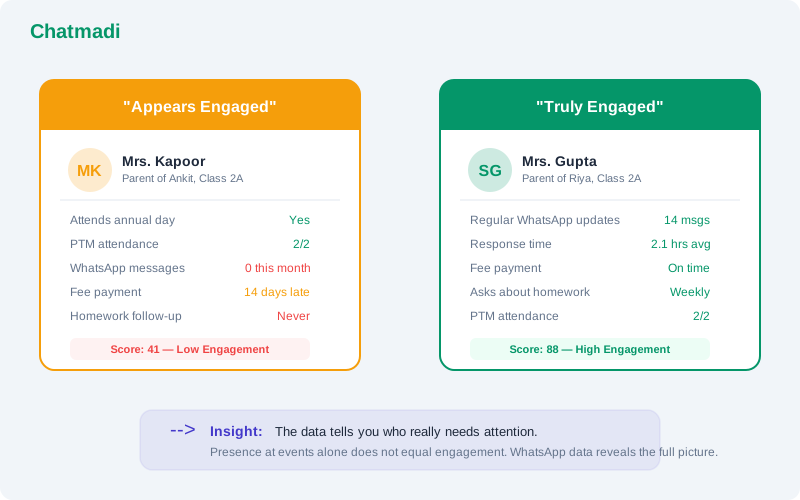
Yes. Chatmadi tracks attendance across all PTMs for each student. Teachers and principals can see which parents consistently attend, which occasionally attend, and which never attend. This data feeds into the parent engagement score.
Does the meeting notes feature work offline?
Meeting notes are entered in the Chatmadi dashboard, which requires an internet connection. Teachers who prefer to take notes on paper during the meeting can enter them into Chatmadi afterward.
---
Your next PTM can be your best PTM. Chatmadi manages the complete lifecycle so you can focus on the conversations that matter. Start free at chatmadi.com
TagsPTM management software school Indiaparent teacher meeting software IndiaPTM RSVP tracking school software Indiahow to improve parent engagement school IndiaChatmadi
C
Chatmadi Team
School Communication Intelligence
The Chatmadi team writes about AI-powered parent communication, school management best practices, and WhatsApp intelligence for Indian schools. Built by Eduloom Technologies OPC Pvt Ltd, Mysore.