How to Run a CBSE School Without Drowning in WhatsApp Messages
In this article
If you are a CBSE school principal, your WhatsApp notification count tells the story of your academic year. April: 200 messages about new admissions. June: 300 messages as Term 1 begins and parent groups become active. September: 400 messages around the first PTM and unit test results. November: 350 messages about half-yearly exam performance. January: 500 messages as board exam preparation intensifies and fee deadlines approach. March: the tsunami. Every parent has questions about annual exams, admit cards, results, and next year's fees. By March, the average CBSE school principal has received or overseen thousands of WhatsApp messages, and the administrative staff has spent hundreds of hours processing them manually. The best WhatsApp CRM for CBSE schools is one that handles each of these peak periods automatically, so the principal stays in control without drowning in messages. That is what Chatmadi does.
The CBSE School Calendar and Its Parent Communication Pressure Points
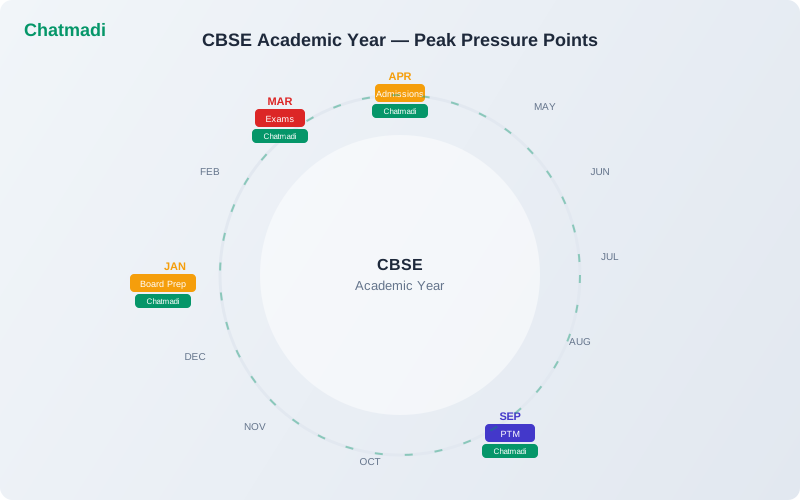
The CBSE academic year runs from April to March. Each month brings specific communication pressures that generate WhatsApp message volume. April to May: admission season closes and new students are onboarded. Parents of new students have dozens of questions about uniforms, books, bus routes, and school rules. Fee structures are communicated for the new academic year. June to July: Term 1 classes begin. Parent WhatsApp groups are created for each class. The volume of messages is high as parents adjust to new teachers, new classrooms, and new routines. Homework notifications begin flowing. August to September: unit tests and the first PTM of the year. Parents message about test preparation, results, and meeting schedules. The first wave of fee reminders goes out for Term 2 instalments. October to November: half-yearly examinations and Diwali holidays. Results generate parent queries and concerns. Some parents raise issues about academic performance that require teacher follow-up. December to January: the quiet period gives way to pre-board preparation for Class 10 and 12. Fee deadline reminders for the third instalment. New admission enquiries begin for the next academic year. February to March: annual examination preparation and the highest-stress period of the year. Parents of board exam students are anxious. Results are awaited. Next year's fee structures are announced. The cycle prepares to begin again. Each of these periods has distinct communication patterns that Chatmadi is designed to handle.
The 4 WhatsApp Overload Seasons Every CBSE Principal Knows
Four periods in the CBSE year generate the most WhatsApp volume and administrative burden. Season one: admission season (January to April). The admission pipeline is active. Enquiries arrive by phone, walk-in, and WhatsApp. Each enquiry needs follow-up. Site visits need scheduling. Documents need tracking. Without a system, leads fall through the cracks. Chatmadi's admission pipeline tracks every lead from enquiry to enrollment, ensuring no potential student is lost. Season two: PTM season (September and February). RSVPs need tracking. Meeting notes need recording. Action items need following up. Without a system, PTMs become standalone events with no follow-through. Chatmadi manages the complete PTM lifecycle: scheduling, RSVP detection from WhatsApp, attendance tracking, meeting notes, and action item monitoring. Season three: fee collection season (every term boundary). Fee reminders need sending. Payment confirmations need tracking. Overdue accounts need follow-up. Without a system, the accounts team spends weeks reconciling payments. Chatmadi detects fee payment confirmations from WhatsApp messages and tracks them against the instalment schedule automatically. Season four: exam season (November and March). Parent anxiety peaks. Questions about syllabus completion, exam preparation, and results flood WhatsApp groups. Teachers are stretched between teaching, invigilation, and parent communication. Chatmadi's dashboard gives teachers a single screen to manage all parent interactions without scrolling through hundreds of messages.
How Chatmadi Handles Each Pressure Point Automatically
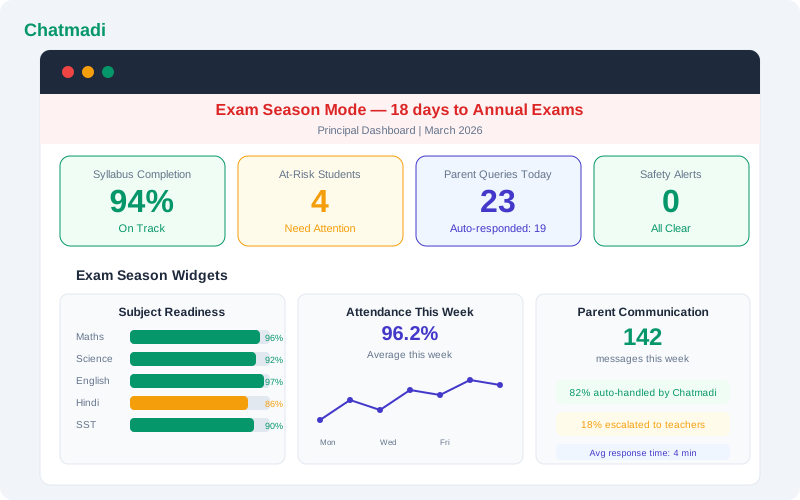
For admission season: Chatmadi's admission pipeline Kanban board tracks every lead through seven stages from enquiry to enrollment. When a parent sends a WhatsApp enquiry, the AI detects the admission intent. The lead is added to the pipeline. Follow-up reminders are generated automatically. The principal sees a real-time view of how many leads are at each stage. For PTM season: Chatmadi creates the PTM, generates WhatsApp notification messages, detects parent RSVP responses from the group chat, tracks attendance on the day, and provides a meeting notes interface for recording discussion points and action items. Before the next PTM, the system shows outstanding action items from the previous meeting. For fee collection: Chatmadi's AI detects fee payment mentions in WhatsApp conversations. When a parent says "transferred the amount" or shares a transaction ID, the system flags it for the accounts team to verify. Fee reminders are drafted automatically with the correct parent name, student name, amount, and due date. Parents who have already paid are excluded from reminder lists. For exam season: the principal dashboard shows syllabus completion across all classes and subjects, at-risk students who need intervention, and parent query volume. Teachers can check their dashboard each morning to see which parents have messaged and what signals the AI has extracted, without reading through every message individually.
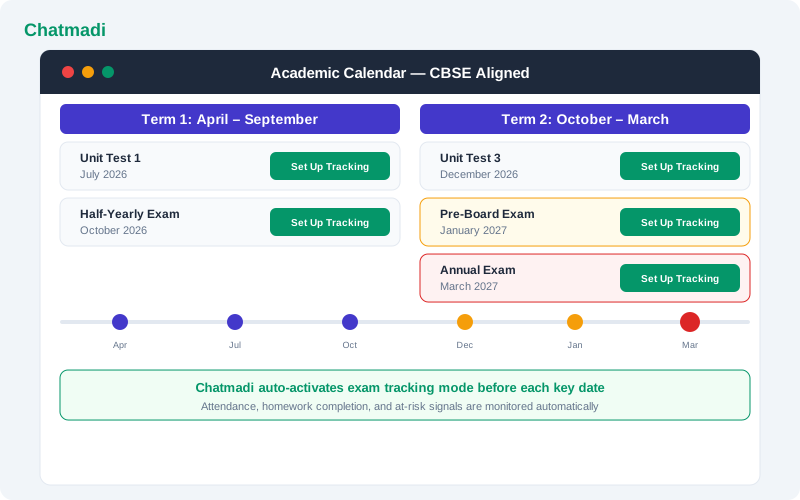
Chatmadi academic calendar showing CBSE aligned term structure with exam dates and setup action buttons
How-To: Setting Up Chatmadi for a CBSE School Academic Year
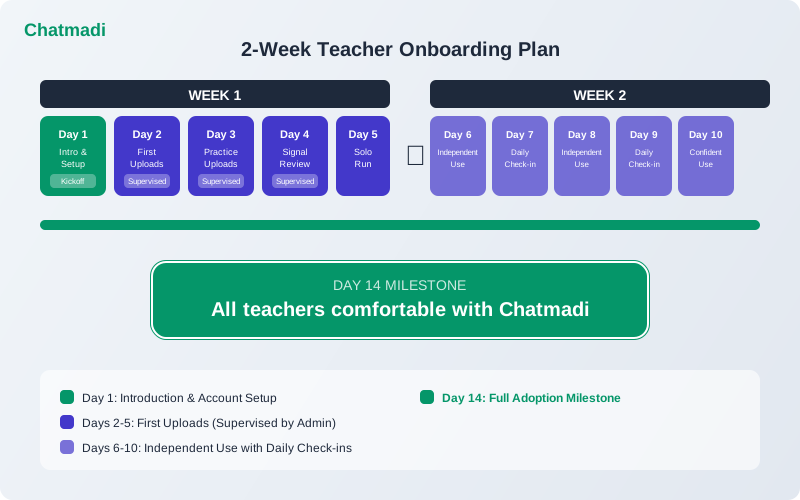
Setting up Chatmadi for a CBSE school follows the standard onboarding process with CBSE-specific configurations. Step one: set your academic calendar. Select CBSE as your board during setup. Configure the term structure: Term 1 (April to September) and Term 2 (October to March). Add exam dates for unit tests, half-yearly, pre-board, and annual examinations. Step two: set up your class structure. Add classes from Nursery or Class 1 through Class 12 as applicable. Add sections for each class. Step three: import students. Bulk import student data from your existing records. Include parent names, phone numbers, and class assignments. Step four: configure subjects and syllabus. For each class, add the CBSE subjects and enter the chapter-wise syllabus. This enables syllabus completion tracking throughout the year. Step five: set up the admission pipeline. Before admission season begins, create the pipeline with the seven stages. Train the reception staff on adding new leads. Step six: configure safety alerts. Designate the principal and any child protection officers as alert recipients. Ensure POCSO detection is enabled. Step seven: set fee structures. Enter the fee amounts and instalment due dates for each class. This allows the fee detection system to match payment confirmations against the correct amounts.
Principal dashboard in exam season mode showing syllabus completion at risk students parent queries and safety alerts
What a CBSE School Principal's Day Looks Like With Chatmadi
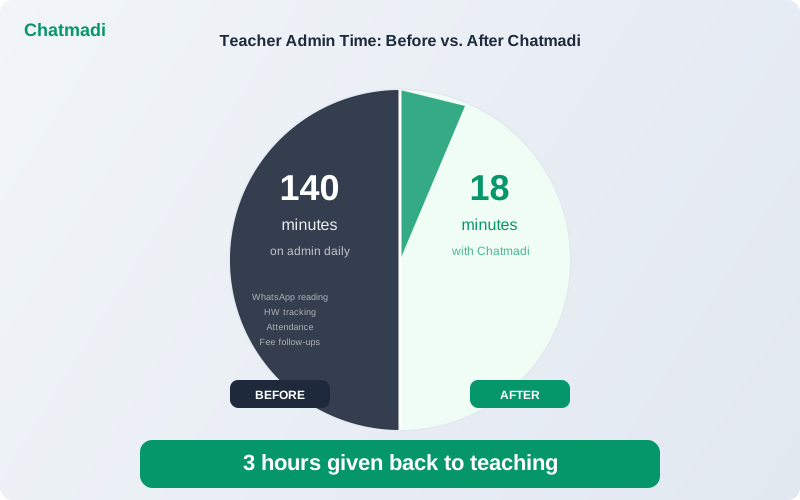
A typical day for a CBSE school principal using Chatmadi starts with a 5-minute dashboard review. The principal opens the school-wide dashboard and checks four things: any new safety alerts (check immediately), today's attendance across classes (note any patterns), fee collection status (note overdue accounts), and upcoming actions (PTM preparations, board meeting deadlines). During the school day, the principal does not need to scroll through WhatsApp groups. If a parent raises a concern in a teacher's conversation, the AI detects it and routes it appropriately. If it is a safety concern, the principal sees it as an alert within minutes. If it is a routine query, the class teacher handles it through their dashboard. At the end of the day, the principal reviews the analytics for any emerging trends: declining attendance in a specific class, falling homework acknowledgement rates, or a teacher whose class data suggests they need support. This takes 5 to 10 minutes. The principal's total Chatmadi time: 15 to 20 minutes per day for complete school visibility. Compare this to the hours many principals spend reading WhatsApp groups, asking teachers for verbal updates, and manually tracking administrative data. Chatmadi does not eliminate the principal's work. It eliminates the time spent gathering information, so the principal can focus on acting on it.
Frequently Asked Questions
Does Chatmadi support CBSE-specific report card formats?
Chatmadi tracks exam results and provides academic analytics. For official CBSE report card generation with the specific format required by the board, schools typically use their ERP or manual process. Chatmadi's academic data can complement this process.
Can Chatmadi track board exam results for Class 10 and 12?
Yes. Board exam results can be entered into Chatmadi for analysis. The system generates subject-wise performance analytics and identifies students who performed above or below their predicted range based on pre-board performance.
How does Chatmadi handle the CCE (Continuous and Comprehensive Evaluation) framework?
Chatmadi's homework acknowledgement tracking and exam result analytics support the formative and summative assessment components of CCE. Teachers can track ongoing engagement through homework data and academic progress through exam analytics.
Is Chatmadi suitable for CBSE schools with both primary and senior secondary sections?
Yes. Chatmadi supports any class structure from Nursery through Class 12. Each class has its own dashboard and data, while the principal sees the aggregated school-wide view.
Can multiple CBSE schools under one management use Chatmadi?
Each school is set up as a separate workspace in Chatmadi. School management groups that operate multiple branches can access all workspaces from a single admin account.
---
CBSE school management has predictable pressure points. Chatmadi handles each one so you can lead instead of firefight. Start free at chatmadi.com
Tagsbest WhatsApp CRM for CBSE schoolsWhatsApp school communication toolhow to manage parent WhatsApp groups schoolreduce teacher workload school software IndiaChatmadi
C
Chatmadi Team
School Communication Intelligence
The Chatmadi team writes about AI-powered parent communication, school management best practices, and WhatsApp intelligence for Indian schools. Built by Eduloom Technologies OPC Pvt Ltd, Mysore.