How Schools Can Use WhatsApp Business API Without Hiring a Tech Team
In this article
The term "WhatsApp Business API" sounds intimidating to most school principals. It conjures images of developers, code, server configurations, and Meta developer accounts. This perception is the single biggest reason why schools that could benefit from a real-time WhatsApp inbox never set one up. The reality is far simpler. Understanding how schools can use WhatsApp API does not require a technology background. It requires choosing a platform like Chatmadi that handles all the technical complexity on behalf of the school. Your school fills out a form. The Chatmadi team does the rest. Within days, your school has a live WhatsApp inbox where every parent message appears in real time and teachers can reply directly from the dashboard.
What Is WhatsApp Business API and Why Should Schools Care?
WhatsApp Business API is a service provided by Meta (the company that owns WhatsApp) that allows organisations to receive and send WhatsApp messages through software instead of through a phone. When your school connects via the API, incoming parent messages appear in your Chatmadi dashboard instead of only on a teacher's personal phone. Multiple staff members can see and respond to the same conversations. Messages are archived, searchable, and automatically matched to student profiles. The API does not change anything for parents. They continue messaging the same school WhatsApp number they always have. They do not see any difference. The change is entirely on the school's side: instead of messages living only on one teacher's phone, they now live in a shared, intelligent dashboard. For schools, this means three practical advantages. First, teachers no longer need to use their personal phones for school communication during class hours. Second, multiple staff can monitor and respond to the same inbox, which is critical when a parent query involves both a class teacher and the accounts department. Third, every message is automatically analysed by Chatmadi's AI, extracting attendance signals, fee payment mentions, and welfare concerns in real time.
The Old Way: Why WhatsApp API Seemed Impossible for Schools
Until recently, setting up WhatsApp Business API required a school to create a Meta developer account, register as a Business Service Provider or work with one, configure webhook endpoints, manage API tokens, and maintain server infrastructure. This is the kind of work that requires a full-time developer or an IT team, neither of which most Indian schools have. Schools that tried to set up the API independently reported spending weeks on configuration, encountering error messages they could not interpret, and eventually giving up. Some schools hired freelance developers, spending between 20,000 and 50,000 rupees on setup alone, with ongoing maintenance costs. This is why how schools can use WhatsApp API has historically been a question with a frustrating answer: theoretically possible, practically impossible without technical resources.
Chatmadi's Concierge Model: API Setup Without the Headache
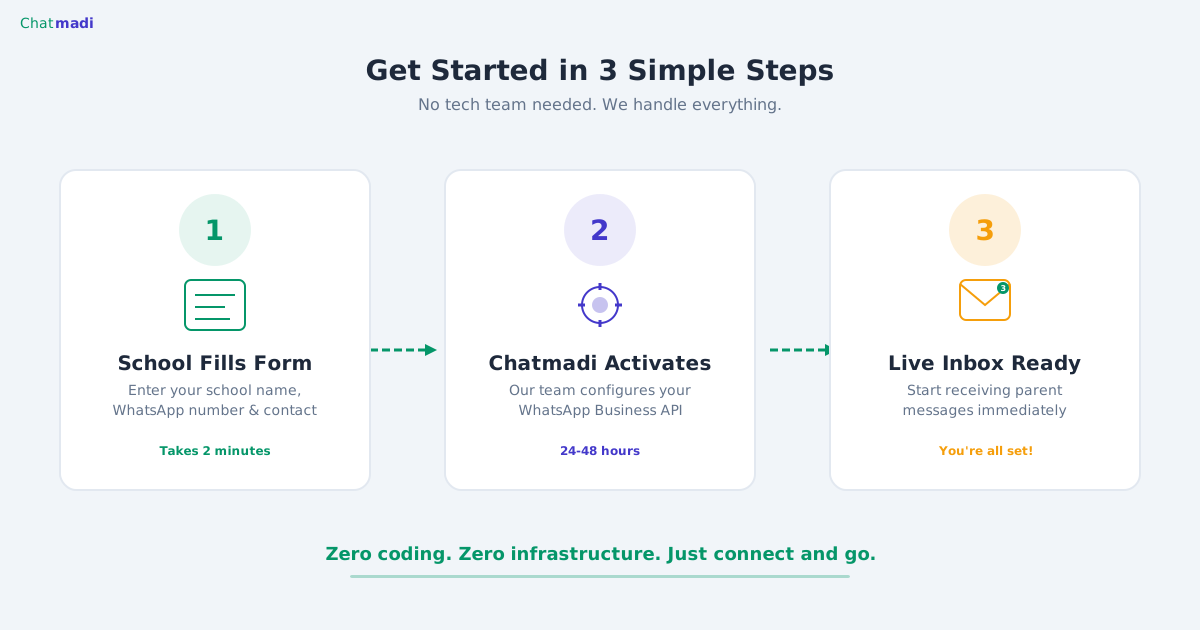
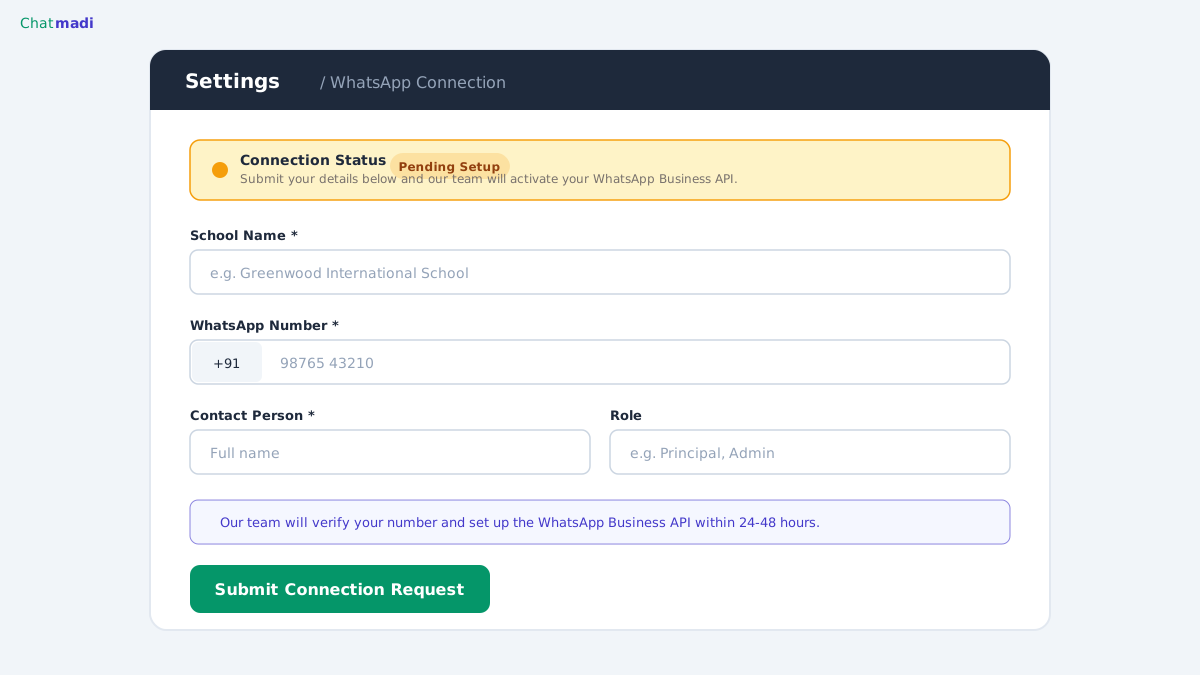
Chatmadi solves this problem through what we call concierge activation. The school does not touch any technical configuration. Here is the complete process. The principal or admin goes to Settings in their Chatmadi dashboard and navigates to the WhatsApp section. They fill in a simple form: school name, WhatsApp Business number, contact person name, and a brief note about why they want API access. They click Submit Connection Request. That is the extent of the school's involvement. From that point, the Chatmadi team handles everything. We configure the Meta WhatsApp Business API credentials, set up the webhook connection to the school's Chatmadi workspace, verify the phone number, test the connection, and activate the live inbox. The school receives a notification when their inbox is ready. The typical turnaround is 2 to 5 business days from request to activation. There is no charge beyond the existing Pro or School plan subscription. API setup is included as part of the plan.
Chatmadi WhatsApp settings page showing connection request form for schools
How-To: Requesting and Activating WhatsApp API for Your School
Step one: ensure your school is on a Chatmadi Pro or School plan. WhatsApp API inbox is a Pro and School plan feature. Step two: confirm you have a WhatsApp Business number for your school. This is the number parents currently message. If your school uses a regular WhatsApp number, it can be converted to WhatsApp Business (free) before the API connection is established. Step three: go to Settings in your Chatmadi dashboard and open the WhatsApp tab. Step four: fill in the connection request form with your school's details. Step five: submit the request. The Chatmadi team will review it within 1 business day and begin the configuration process. Step six: once the connection is active, you will see a green "Connected" indicator in your WhatsApp settings. All incoming messages will begin appearing in your Chatmadi inbox immediately. Step seven: invite your class teachers and admins to start using the inbox. Each user can see conversations relevant to their class or role.
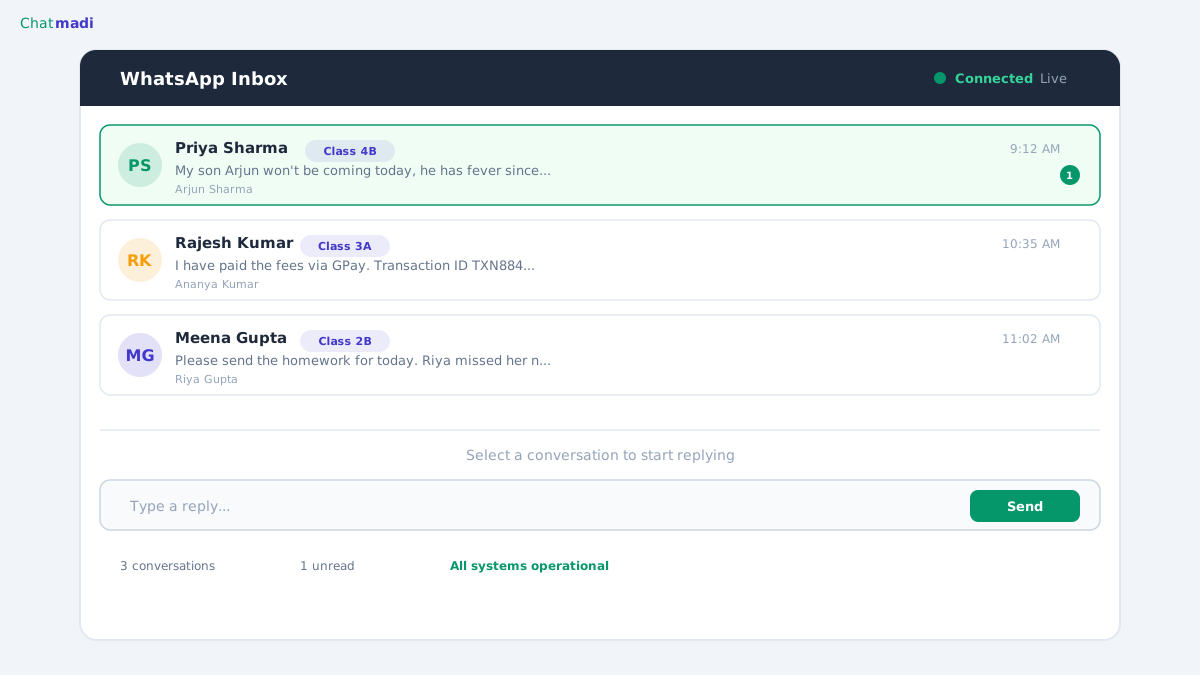
Chatmadi live WhatsApp inbox showing parent message threads with student matching
What Your School Can Do Once WhatsApp API Is Active
With the API active, your school gains several capabilities that the export method does not provide. Real-time message visibility means parent messages appear on the dashboard within seconds of being sent. Teachers can reply from Chatmadi without switching to their personal phone. Multiple staff members can view and respond to the same conversation thread. Messages are automatically matched to student profiles based on the sender's phone number, so every conversation has context. The AI analysis runs in real time on every incoming message, not in batches after export. Safety and welfare concerns are flagged the moment they are sent, not hours later when the teacher exports the conversation. For schools with high parent communication volume, the API inbox transforms Chatmadi from a batch analysis tool into a live communication intelligence platform. The export method remains available and continues to work for conversations from teacher personal numbers or historical analysis. The two methods complement each other perfectly.
Frequently Asked Questions
Does the API connection replace WhatsApp on the school's phone?
No. The school's WhatsApp Business number continues to work normally on the phone. The API creates a parallel connection. Messages appear on both the phone and in the Chatmadi inbox simultaneously.
Can multiple teachers see the same inbox?
Yes. All authorised users in the school's Chatmadi workspace can view the WhatsApp inbox. Messages are tagged with the student's name and class, so teachers can quickly identify conversations relevant to their class.
What happens if the API connection goes down?
Messages continue to arrive on the school's phone normally. The export method remains available as a fallback. The Chatmadi team monitors connections and resolves issues promptly.
Is there an additional fee for WhatsApp API setup?
No. API setup and activation are included in the Pro and School plan subscription. There are no additional setup charges, per-message fees, or API markup costs.
Can I disconnect the API later if I want to?
Yes. The API connection can be deactivated from Settings at any time. Your school's WhatsApp number returns to phone-only operation. All previously received messages remain in your Chatmadi workspace.
---
Your school does not need a tech team to use WhatsApp Business API. Chatmadi handles everything. Start free at chatmadi.com
TagsWhatsApp Business API schoolschool WhatsApp inboxWhatsApp API setup schoolschool communication technologyChatmadi
C
Chatmadi Team
School Communication Intelligence
The Chatmadi team writes about AI-powered parent communication, school management best practices, and WhatsApp intelligence for Indian schools. Built by Eduloom Technologies OPC Pvt Ltd, Mysore.