The Class Teacher Dashboard: Giving Every Teacher Full Visibility of Their Class
In this article
If you are a class teacher in an Indian school, your job description is approximately this: teach your subject, manage your classroom, track attendance for 30 to 40 students, know each student's academic performance across all subjects, know which parents are engaged and which are not, follow up on fee payments when the accounts team asks, handle parent communications on WhatsApp, prepare for PTMs with individual talking points for each parent, flag welfare concerns to the principal, manage homework assignments and track acknowledgements, and be available for the dozen other things that come up every day. To do all of this, you are given a register, a WhatsApp group, and your memory. No dashboard. No data. No system. Subject teacher dashboard software India teachers need is not a luxury. It is a necessity for doing the job that schools expect of class teachers. Chatmadi's class teacher dashboard puts every piece of information a class teacher needs on a single screen, updated in real time from WhatsApp conversation data.
What a Class Teacher Is Expected to Know (And How Impossible It Is Without Tools)
The expectation placed on Indian class teachers is enormous. At any given moment, the class teacher is expected to know: which students are present today and which are absent, why each absent student is absent, which students have been absent multiple times recently, whether all parents acknowledged yesterday's homework, which parents have not paid fees for this term, whether any parent has raised a concern that needs attention, what the upcoming PTM date is and which parents have confirmed, which students are declining academically, and which parents have not communicated with the school in a while. Without a tool, the teacher tracks this information across multiple sources: the attendance register, the WhatsApp group chat, private WhatsApp conversations, the fee register from the accounts office, mental notes from recent conversations, and whatever the principal mentioned in the last staff meeting. The cognitive load is unsustainable. Information gets lost. Follow-ups are forgotten. Concerned parents do not get timely responses. The teacher is not failing. The system is failing the teacher. Chatmadi's class teacher dashboard consolidates all of this information into a single screen that takes less than 5 minutes to review each morning. Every metric is derived from data the school already generates, primarily through WhatsApp conversations.
Everything a Class Teacher Dashboard Must Show to Be Useful
A class teacher dashboard that actually helps must show five things at a glance. First: today's attendance. How many students are present, how many are absent, and why. The teacher should not have to scroll through WhatsApp messages to figure this out. The dashboard should show the absent list with reasons already extracted from parent messages. Second: homework engagement. For the most recent homework assignment, what is the acknowledgement rate? Which parents have acknowledged and which have not? The teacher should be able to send a targeted reminder to non-acknowledging parents with one click. Third: fee status. How many students in the class are current on fees and how many have overdue payments? The teacher should not have to visit the accounts office to get this information. Fourth: welfare alerts. Are there any active safety alerts, at-risk flags, or declining engagement scores that need attention? These should be visible as soon as the teacher opens the dashboard, not buried in a separate section. Fifth: upcoming actions. Is there a PTM coming up? Are there action items from the last PTM that are due? Are there parents the teacher has been meaning to follow up with? The dashboard should show a prioritised action list so the teacher knows exactly what to do next. Chatmadi's class teacher dashboard shows all five of these in a single view.
Inside Chatmadi's Class Teacher Dashboard: Every Section Explained
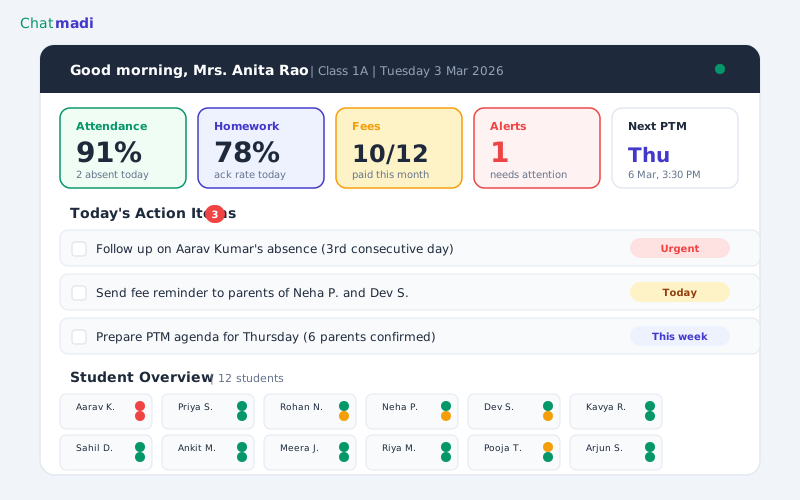
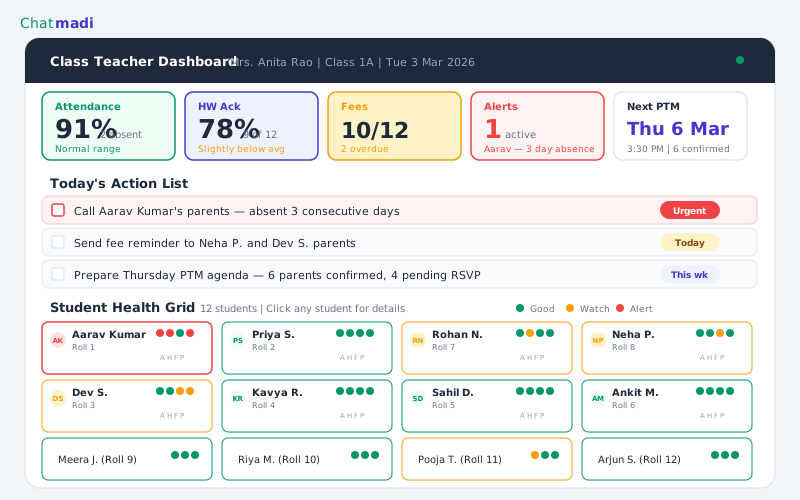
The dashboard opens with a personalised greeting and a summary bar. "Good morning, Mrs. Anita Rao. Class 1A. Tuesday, 3 March 2026." Below the greeting are five metric cards arranged in a row. The attendance card shows today's attendance: "11/12 present. 1 absent (Diya Patel, family function)." Clicking the card opens the full attendance view with each student's status and the parent messages that informed the absence detection. The homework card shows the most recent assignment's acknowledgement rate: "9/12 acknowledged (75%)." Clicking opens the full assignment detail with per-student status and a one-click reminder button for the three parents who have not acknowledged. The fees card shows the current fee status: "10/12 current. 2 overdue." Clicking opens the fee detail with student names and overdue amounts. The class teacher can see who owes and how much without visiting the accounts office. The alerts card shows active welfare items: "1 alert. Rohan Nair, attendance declining." Clicking opens the student's welfare profile with the specific signals that triggered the alert. The PTM card shows the next scheduled PTM: "PTM Thursday 6 Mar. 9/12 RSVPs received." Clicking opens the PTM dashboard with RSVP status for each parent. Below the metric cards is the action list: a prioritised list of things the teacher needs to do today. "Send homework reminder to 3 parents." "Follow up with Mrs. Nair about Rohan's attendance." "Review PTM notes from last session before Thursday." Each action is clickable and takes the teacher directly to the relevant section. Below the action list is the student grid: a visual overview of all students in the class with colour-coded health dots. Each student's name appears with small indicators for attendance (green, amber, or red), homework engagement (green, amber, or red), and parent engagement (green, amber, or red). This grid lets the teacher see the class health at a glance and identify students who need attention.
Full detailed teacher dashboard with attendance homework fees alerts and PTM metrics with student grid and health dots
How-To: Building Your Daily 10-Minute Classroom Routine with Chatmadi
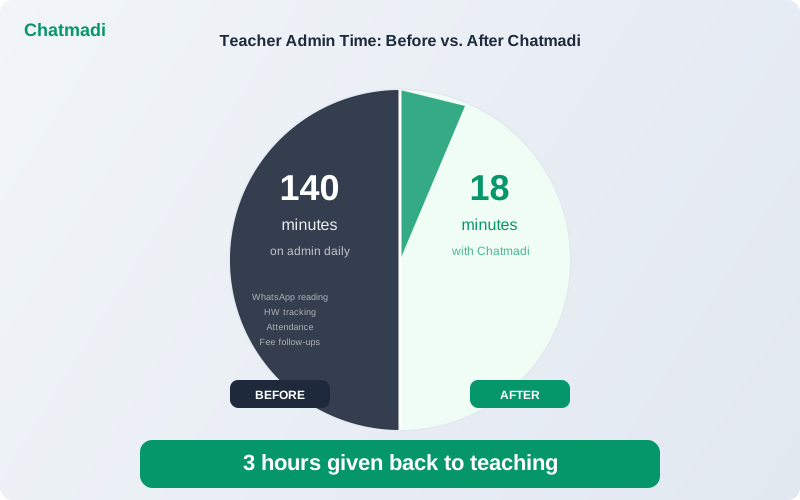
The most effective way to use Chatmadi's class teacher dashboard is to build a 10-minute morning routine. This routine replaces the 30 to 45 minutes of fragmented checking that teachers currently do across WhatsApp, registers, and mental notes. Minute one to two: open the dashboard and check today's attendance card. Confirm the AI-detected absences match the students who are actually absent from class. If any student is absent without a parent notification, mark them manually and note to follow up. Minute three to four: check the homework card. Review the acknowledgement rate for yesterday's assignment. If the rate is below 70%, use the one-click reminder to send a message to non-acknowledging parents. Minute five to six: check the alerts card. If there are active welfare alerts, read the details and plan your response. If the alert requires a parent call, add it to your schedule for the day. Minute seven to eight: check the fee status card. If there are overdue accounts and the accounts team has asked you to follow up, note which parents to message. Minute nine to ten: review the action list. Check off any actions you have completed. Note the priority actions for today. If there is a PTM coming up, review your preparation status. This 10-minute routine gives the teacher a complete picture of their class before the first lesson begins. Everything they need to know is in one place. Everything they need to do is in one list.
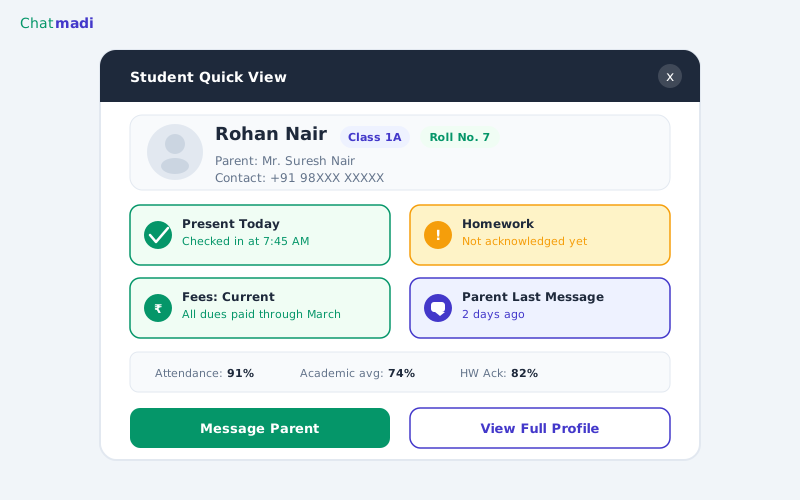
Student quick view popup for Rohan Nair showing mini stats for attendance homework fees and parent engagement
What Changes When Every Teacher Has Full Class Visibility
When every class teacher in a school has dashboard-level visibility, several things change at the school level. Response times improve. Teachers who can see a parent concern on their dashboard respond faster than teachers who discover the concern while scrolling through a WhatsApp group two days later. Faster response means happier parents and earlier intervention on welfare issues. Data quality improves. When teachers review their dashboard daily, they notice discrepancies and correct them. An absence that was not detected by the AI is manually added. A homework acknowledgement that was missed is corrected. The data becomes more accurate over time because teachers are actively reviewing it. Principal visibility improves. When every teacher's class data feeds into the principal's school-wide dashboard, the principal sees the full picture without needing to interview individual teachers. Staff meetings shift from "what is happening in your class?" to "I see that Class 3B homework acknowledgement is declining. What is driving that?" Teacher satisfaction improves. Teachers who have tools to manage their workload report lower stress and higher job satisfaction. The mental burden of tracking 30 students across multiple dimensions without a system is significant. A dashboard reduces this burden by centralising information and automating routine tracking. Parent satisfaction improves. When teachers respond faster, follow up more consistently, and come to PTMs prepared with data about each student, parents notice. The school feels more professional and more attentive.
Frequently Asked Questions
Does the teacher dashboard work on a phone?
Yes. Chatmadi's dashboard is responsive and works on mobile browsers. While a laptop or tablet provides a better experience, teachers can check their dashboard from their phone during any free moment.
How long does it take for the dashboard to populate with data?
The dashboard begins populating as soon as the class is set up in Chatmadi and conversations are uploaded. Within two weeks of regular uploads, the dashboard has enough data for meaningful insights.
Can I customise which sections appear on my dashboard?
The default layout is designed for the typical class teacher workflow. Future releases will allow teachers to pin their most-used sections and hide sections that are less relevant to their specific role.
Does the dashboard refresh automatically?
The dashboard updates each time new conversation data is uploaded. If using the API integration, updates happen in near-real-time. If using manual uploads, the dashboard reflects the most recently uploaded conversation data.
Can subject teachers who are not class teachers also access a dashboard?
Yes. Subject teachers have a dedicated dashboard that shows their assigned classes and subjects with syllabus tracking, homework analytics, and exam performance data. The class teacher dashboard includes all of these plus the full welfare and engagement view.
---
You already do the hardest job in the school. Chatmadi gives you the dashboard to do it with full visibility. Start free at chatmadi.com
The Chatmadi team writes about AI-powered parent communication, school management best practices, and WhatsApp intelligence for Indian schools. Built by Eduloom Technologies OPC Pvt Ltd, Mysore.