How to Track Syllabus Completion for Every Subject Across Every Class
In this article
It is February. The annual exams are six weeks away. The principal of a CBSE school asks the Class 6 Maths teacher how the syllabus is progressing. The teacher says "Almost done, ma'am. Just two chapters left." The principal is reassured. Three weeks later, the principal discovers that "two chapters" actually means two chapters plus the revision of four chapters that were taught too quickly, plus a chapter that was skipped because "the students were not ready." The syllabus is effectively 30% incomplete with three weeks to the exam. This scenario plays out in schools across India every academic year. It happens because principals have no systematic way to track syllabus completion across subjects and classes. They depend on teacher self-reporting, which is naturally optimistic. Syllabus completion tracking software school administrators need must provide objective, real-time visibility into where every subject stands in every class. Chatmadi's subject teacher dashboard does exactly this.
The Syllabus Completion Problem Every Indian Principal Discovers Too Late
Syllabus completion is one of the most important metrics in an Indian school because exam performance depends directly on it. A student cannot score well on a chapter they were never taught. Yet it is one of the least tracked metrics. Most principals track it through informal check-ins: asking teachers in staff meetings, walking past classrooms, or reviewing lesson plans that may or may not reflect reality. The problem with informal tracking is that it depends on accurate self-reporting. Teachers face genuine pressures that cause syllabus delays: student absenteeism that requires re-teaching, slow learner groups that need extra time on difficult concepts, school events that consume teaching days, and unexpected holidays. These pressures are real and understandable. But when the principal only hears about delays in March, there is no time to address them. The solution is not to blame teachers for delays. It is to create visibility so that delays are detected in November when there is still time to adjust pace, arrange extra classes, or reallocate teaching resources. A principal who knows in November that Class 6 Maths is 15% behind schedule can take action. A principal who discovers in February that it is 30% behind cannot.
How Chatmadi's Subject Teacher Dashboard Tracks Syllabus Progress
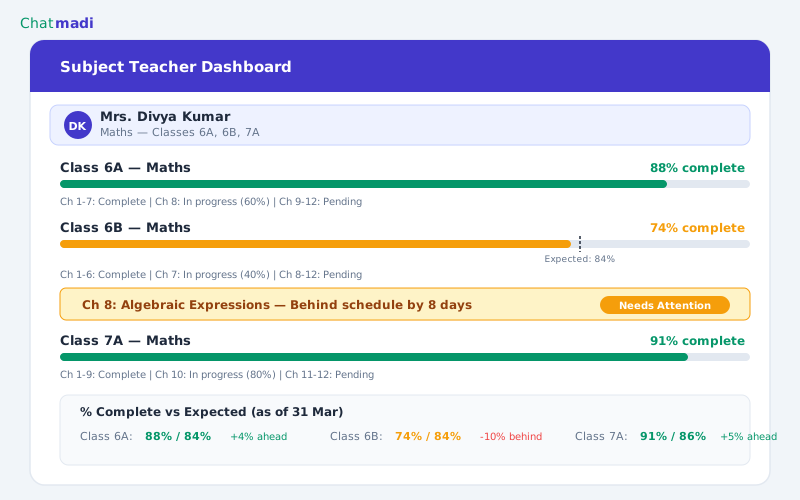
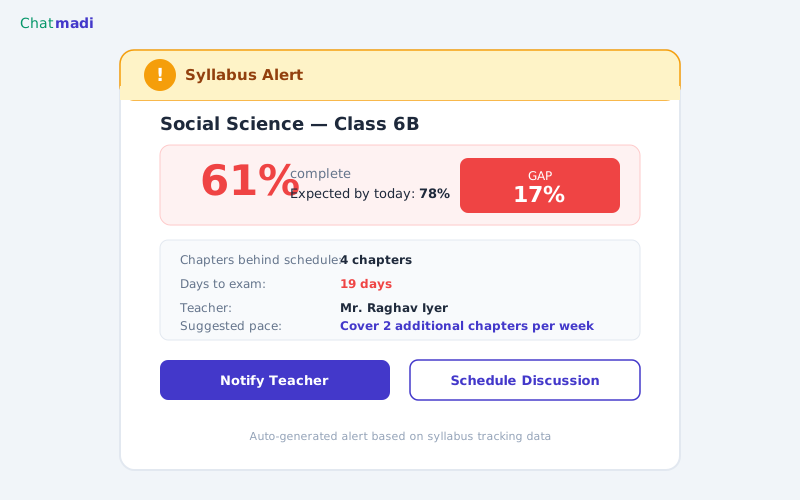
Chatmadi's syllabus tracking is built into the subject teacher dashboard. When a subject teacher logs into Chatmadi, they see each class they teach with a chapter-by-chapter syllabus breakdown. Each chapter has three status options: Not Started, In Progress, and Completed. As the teacher completes a chapter, they mark it as Completed with a single click. This takes less than 10 seconds per chapter. The dashboard automatically calculates the completion percentage for each class-subject combination. It also calculates the expected completion percentage based on the current date and the total teaching days remaining before exams. When actual completion falls below expected completion by more than 10 percentage points, the system generates an alert. The subject teacher sees the alert on their own dashboard: "Maths Class 6B is at 61% completion. Expected by today: 78%. You are 17 percentage points behind schedule." This is not a punitive notification. It is an informational one that helps the teacher plan their remaining teaching days. The principal also sees the alert on their school-wide dashboard. This creates visibility without requiring the principal to chase individual teachers for updates. The data speaks for itself.
The Principal's View: School-Wide Syllabus Completion at a Glance
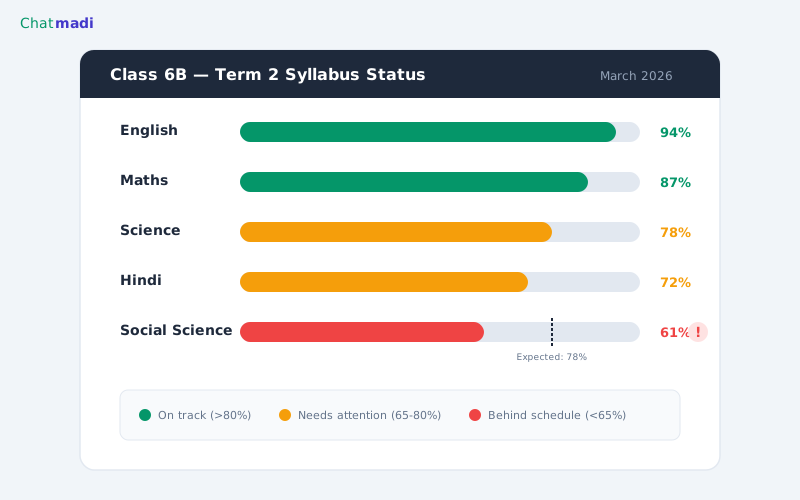
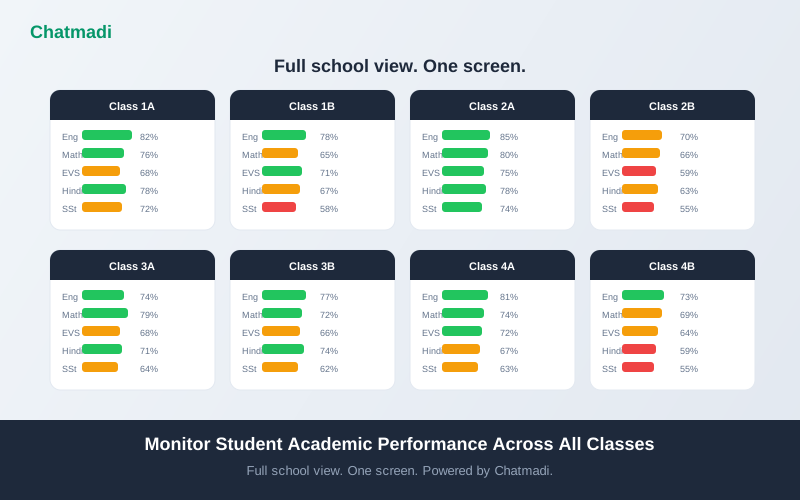
The principal's dashboard shows a matrix of all classes and all subjects with colour-coded completion indicators. Green means the subject is on track (actual completion is within 5 percentage points of expected completion). Amber means the subject is slightly behind (5 to 15 percentage points below expected). Red means the subject is significantly behind (more than 15 percentage points below expected). This matrix takes less than 10 seconds to scan. If the principal sees red in Class 6B Social Science and Class 7A Hindi, they know immediately where to focus. They can click into any cell to see the detailed chapter-by-chapter breakdown, the teacher's name, and the gap analysis. The principal can also view trends over time. If a subject was amber last month and is now red, the gap is widening. If it was red last month and is now amber, the teacher is catching up. Trend data helps the principal distinguish between subjects that are slightly behind but recovering and subjects that are falling further behind each week. This school-wide view transforms syllabus monitoring from a manual, interview-based process into a data-driven, real-time dashboard. Chatmadi gives the principal the same visibility into syllabus completion that they have into financial metrics, without requiring any additional reporting burden on teachers beyond a few clicks per week.
Subject teacher dashboard for Maths teacher showing chapter completion tracker with behind schedule warning
How-To: Setting Up Syllabus Tracking in Chatmadi for All Subjects
Setting up syllabus tracking takes about 30 minutes per subject and is a one-time setup at the start of each academic year. Step one: define the syllabus structure. For each subject and class, enter the chapter names and the expected completion sequence. Most CBSE and state board schools follow a prescribed chapter sequence, so this is straightforward. Chatmadi supports importing chapter lists from a spreadsheet if you have them in digital format. Step two: set the academic calendar. Enter the total teaching days for each term, accounting for holidays and exam days. This allows the system to calculate expected completion percentage for any given date. Step three: assign subject teachers. Link each class-subject combination to the teacher responsible for teaching it. This determines whose dashboard shows which syllabus tracker. Step four: establish update routine. Ask subject teachers to update their chapter status once a week, typically on Friday afternoon. The update takes less than 2 minutes per class and involves marking newly completed chapters as Completed and updating any In Progress chapters. Step five: configure alerts. Set the gap threshold that triggers principal alerts. The default is 10 percentage points, but schools can adjust this based on their tolerance. A stricter threshold (5 points) generates more alerts but catches problems earlier. A looser threshold (15 points) generates fewer alerts but may miss early-stage delays.
Syllabus alert notification showing Social Science Class 6B at 61 percent with gap analysis and suggested actions
Using Completion Data to Plan for Exam Season
Syllabus completion data becomes most valuable in the eight weeks before annual exams. At this point, the data tells the principal exactly which subjects need intervention and how much. For subjects that are on track (green), no action is needed. The teacher has sufficient time to complete the remaining chapters and conduct revision. For subjects that are slightly behind (amber), the principal can work with the teacher to identify time-saving strategies: combining related topics, focusing on exam-relevant sections, or allocating an extra period per week from a subject that is ahead of schedule. For subjects that are significantly behind (red), more aggressive intervention is needed. Options include arranging substitute or additional classes, reducing the depth of coverage for non-exam-critical topics, coordinating with other subject teachers to redistribute teaching periods, or scheduling weekend revision sessions for the most affected classes. The key insight is that all of these interventions are possible when the data is available eight weeks before exams. None of them are possible when the principal discovers the gap three weeks before exams. Chatmadi's syllabus tracking turns a March crisis into a January conversation, which is the difference between a problem and a solution.
Frequently Asked Questions
Does Chatmadi integrate with CBSE or state board syllabi?
Chatmadi allows you to enter any syllabus structure. Schools can input the chapter names and sequence for their specific board (CBSE, ICSE, state board) during initial setup. Pre-built templates for common boards are planned for future releases.
What if a teacher marks a chapter as complete when it was only partially covered?
The system relies on teacher honesty, as any tracking system does. However, when exam results show that a class performed poorly on a specific chapter, the data can be cross-referenced with the syllabus tracker to identify potential accuracy issues.
Can the principal see which teachers are consistently behind?
Yes. Over multiple terms, the data reveals patterns. A teacher whose subjects are consistently behind schedule may need support with time management, teaching methodology, or workload distribution.
Does syllabus tracking work for subjects with project-based or continuous assessment components?
Yes. Projects and continuous assessment activities can be added as syllabus items alongside chapters. They are tracked with the same Not Started, In Progress, and Completed status system.
How does Chatmadi handle mid-year syllabus changes from the board?
Schools can add, remove, or reorder chapters in the syllabus structure at any time. The completion calculations adjust automatically to reflect the updated structure.
---
Never be surprised by an incomplete syllabus again. Chatmadi gives principals real-time visibility across every subject and class. Start free at chatmadi.com
The Chatmadi team writes about AI-powered parent communication, school management best practices, and WhatsApp intelligence for Indian schools. Built by Eduloom Technologies OPC Pvt Ltd, Mysore.