How to Detect Child Safety Concerns from WhatsApp Messages in Your School
In this article
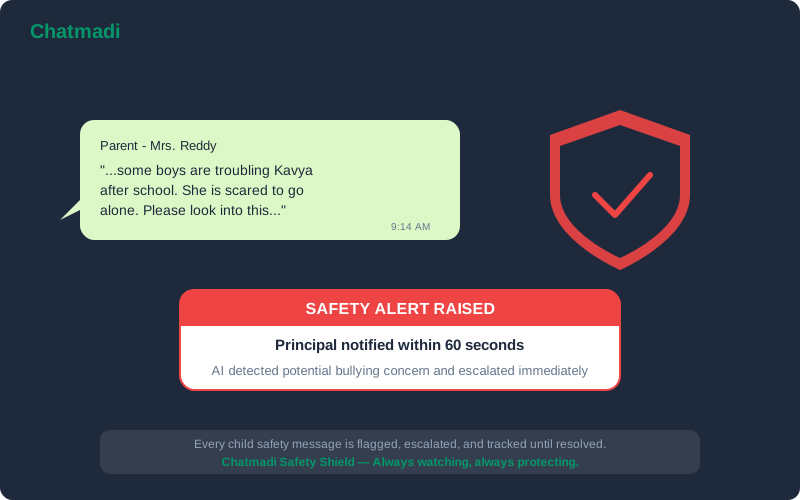
A parent sends a message to the class teacher at 9:14 AM: "Ma'am, Kavya has been saying that some older boys are troubling her after school. She is scared to go to the playground now. Please look into this." The class teacher is in the middle of a lesson. She sees the notification but decides to respond after class. After class, she has a staff meeting. By lunch, she has forgotten about the message. By evening, the parent has not received a response. The next morning, the parent is at the school gate, upset and anxious. This scenario plays out in schools across India every week. Not because teachers do not care, but because the volume of messages they receive makes it easy for critical signals to get buried among routine communications. Child safety monitoring school software must ensure that safety-relevant messages are never lost in the noise. Chatmadi's AI detects safety concerns in parent WhatsApp messages and escalates them to the teacher and principal within minutes.
The Safety Concern That Slipped Through the Cracks (A School's Worst Fear)
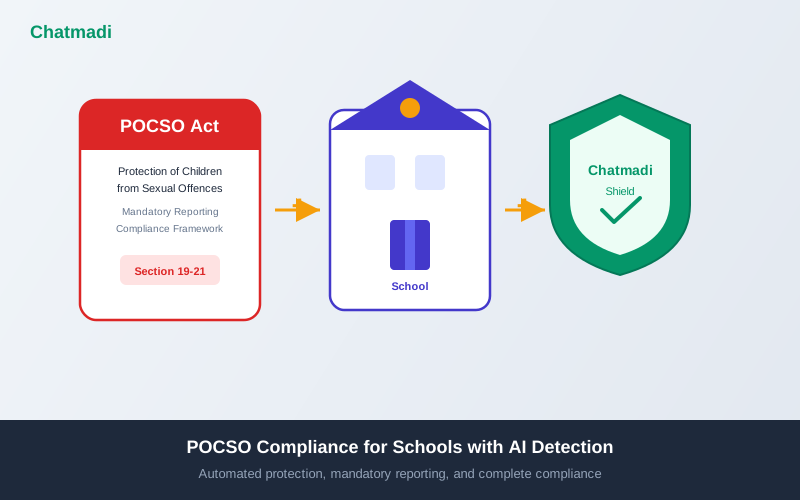
Every school administrator has a version of this fear: a parent communicated a safety concern, the school did not act on it, and something happened. The concern may be about bullying, about an older student intimidating a younger one, about inappropriate behaviour witnessed on the school bus, about a child's sudden behavioural changes, or about something a child said at home that suggests they are being mistreated. In most cases, the parent's message is their way of reaching out for help. They trust the school to take action. When the school does not respond promptly, that trust is damaged, sometimes irreparably. The legal dimension adds urgency. Under the Protection of Children from Sexual Offences (POCSO) Act 2012, schools in India have a legal obligation to report suspected child sexual abuse to the authorities. If a parent's message contains a signal that could indicate abuse, delayed action is not just a trust failure. It is a potential legal failure. Schools cannot afford to have safety signals buried in a WhatsApp scroll. Every safety-relevant message must be identified, escalated, and acted upon within the shortest possible timeframe.
How Child Safety Signals Appear in Parent WhatsApp Messages
Safety concerns rarely arrive as formal complaints. They come as fragments embedded in casual messages. A parent mentions that their child "does not want to go to school anymore" without explaining why. A parent says their child "came home crying" and asks the teacher to "keep an eye on them." A parent reports that their child mentioned being "hit" or "pushed" by another student. A parent expresses concern that their child has become "quiet" or "withdrawn" recently. Each of these messages may or may not indicate a serious safety concern. But each one deserves immediate attention and investigation. The challenge for teachers is distinguishing these signals from the dozens of other messages they receive daily. A message about a child being "upset" could be about a minor friendship disagreement or about something much more serious. Without a system to flag these messages for priority attention, teachers must rely on their own ability to scan every message and make real-time judgements while simultaneously managing a classroom. The categories of safety signals that Chatmadi detects include: physical safety (mentions of hitting, pushing, fighting, injuries), emotional safety (mentions of bullying, exclusion, teasing, intimidation, fear), behavioural changes (mentions of withdrawal, refusal to attend school, crying, sleep changes), and POCSO-relevant signals (mentions of inappropriate touching, uncomfortable situations, or language that suggests potential abuse).
How Chatmadi's AI Detects and Escalates Safety Concerns
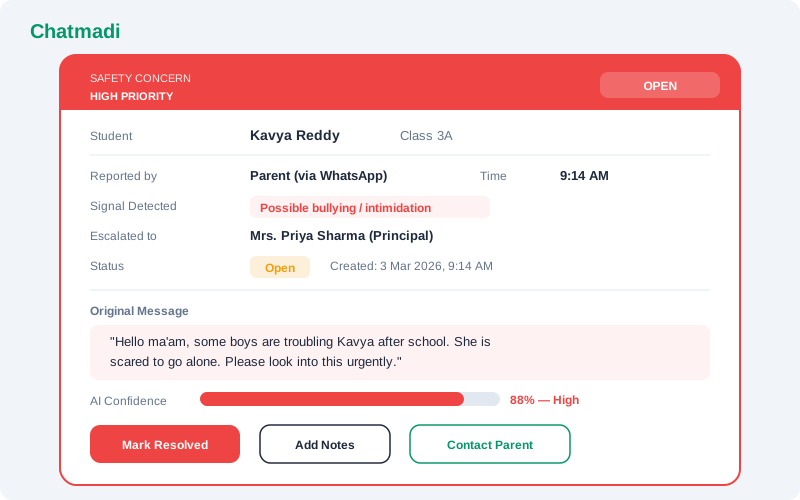
Chatmadi's safety detection system operates in three stages. Stage one: signal identification. When a WhatsApp conversation is uploaded or received, the AI scans every parent message for safety-relevant keywords, phrases, and patterns. The system uses contextual analysis rather than simple keyword matching. The phrase "my child was hit by a cricket ball during PE" is different from "my child says an older boy hit him." Both contain the word "hit" but the context is different and the response should be different. Stage two: severity classification. Detected signals are classified into three severity levels. High severity includes any mention of physical harm by another person, POCSO-relevant signals, threats, or fear for the child's safety. Medium severity includes bullying, social exclusion, emotional distress, and behavioural changes. Low severity includes minor conflicts between students, general complaints about the school environment, and non-urgent welfare observations. Stage three: escalation. High-severity alerts are immediately flagged to both the class teacher and the principal. Medium-severity alerts are flagged to the class teacher with a recommendation to investigate and respond within 24 hours. Low-severity alerts are logged for the class teacher's review during their next dashboard check. All alerts include the original message, the parent's name, the student's name and class, the detected signal type, the severity level, and a timestamp. The teacher can take immediate action: respond to the parent, add notes, mark the alert as under investigation, or escalate further.
Chatmadi safety alert card showing high priority concern for student Kavya Reddy with escalation details and action buttons
How-To: Configuring Safety Alerts in Chatmadi for Your School
Setting up the safety alert system in Chatmadi takes less than ten minutes and should be one of the first things a school configures. Step one: designate escalation contacts. In the settings, specify who receives high-severity alerts. At minimum, this should include the principal and the school counsellor if one is on staff. For medium-severity alerts, the class teacher is the default recipient. Step two: review the detection categories. Chatmadi's default categories cover physical safety, emotional safety, behavioural changes, and POCSO-relevant signals. Schools can enable or disable specific categories based on their needs, though disabling any POCSO-related detection is strongly discouraged. Step three: set notification preferences. Choose how escalation recipients are notified: dashboard notification, email, or both. For high-severity alerts, email notification ensures the alert reaches the principal even if they are not actively using the dashboard. Step four: establish a response protocol. Document how the school will respond to each severity level. For high-severity alerts: immediate acknowledgement to the parent, investigation within the same day, principal briefed within one hour, and documentation of all actions taken. For medium-severity alerts: acknowledgement to the parent within 24 hours, investigation within 48 hours, and class teacher to add notes and update the alert status. Step five: train all staff. Ensure that every teacher understands how the safety alert system works, what they see on their dashboard, and what is expected of them when an alert appears.
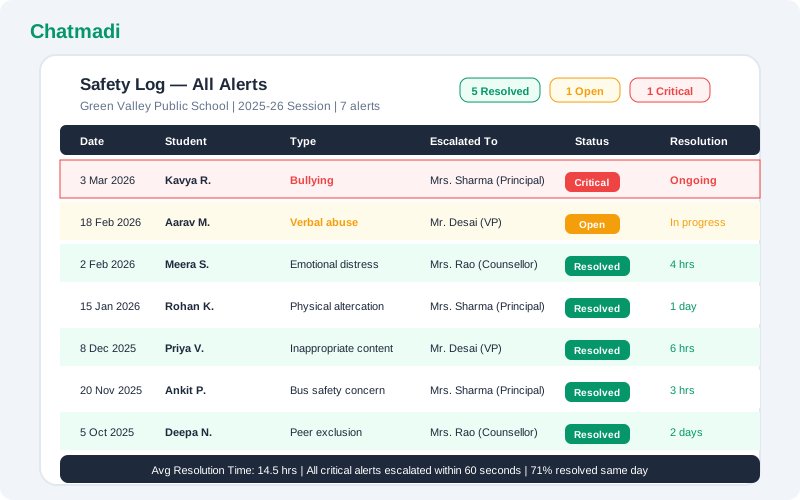
Safety log showing seven historical alerts with dates types statuses and resolution times
What to Do When Chatmadi Raises a Safety Alert
When a safety alert appears on a teacher's or principal's dashboard, the response should follow a structured protocol. First, read the original message carefully. Understand what the parent is saying and the specific concern they are raising. Avoid making assumptions about severity before reading the full context. Second, acknowledge the parent immediately. A response such as "Thank you for bringing this to our attention. We take this very seriously and will look into it today" reassures the parent that their concern is being heard. Third, investigate. Speak with the child in a private, safe setting. Speak with any witnesses or other staff members who may have relevant information. If the concern involves another student, speak with that student separately. Document everything. Fourth, take action. Based on the investigation, take appropriate action. This may range from increased supervision in a specific area to formal disciplinary proceedings against another student to filing a report with the authorities if POCSO criteria are met. Fifth, follow up with the parent. Within 24 to 48 hours of the initial report, update the parent on what the school found and what action has been taken. Even if the investigation is ongoing, the parent should know that the school is actively addressing their concern. Sixth, update the alert in Chatmadi. Record all actions taken, the outcome of the investigation, and the resolution. This creates an audit trail that protects the school and demonstrates due diligence.
Frequently Asked Questions
Does Chatmadi report safety concerns directly to the police or child welfare authorities?
No. Chatmadi raises alerts to school staff only. The decision to report to authorities is the school's responsibility under the applicable laws. Chatmadi documents the alert timeline and actions taken, which can serve as evidence of the school's due diligence.
Can parents see that a safety alert has been raised?
No. Safety alerts are internal to the school. Parents see only the communication they receive from the teacher or principal in response to their message. The alert system is a backend tool for school management.
What if the AI flags a message as a safety concern but it is actually harmless?
False positives are possible and expected. A parent saying "Rohan had a fight with his homework today" might be flagged because of the word "fight." Teachers can dismiss false positives with a single click. It is better to have occasional false positives than to miss a genuine concern.
Is the safety alert log admissible as evidence if a legal issue arises?
The safety alert log provides a timestamped record of when concerns were raised, when the school was notified, and what actions were taken. While admissibility depends on the specific legal context, this documentation demonstrates the school's awareness and response process.
What training does Chatmadi provide for handling POCSO-related alerts?
Chatmadi's documentation includes guidelines for handling POCSO-relevant alerts, including the legal obligations of school staff under the Act. However, schools should also invest in formal POCSO training for all staff members, which is a legal requirement in many Indian states.
---
A child's safety should never depend on whether a WhatsApp message gets lost in the scroll. Chatmadi ensures every safety signal is seen and acted upon. Start free at chatmadi.com
Tagschild safety monitoring school softwarePOCSO alert school software Indiabullying detection school software Indiastudent welfare tracking software schoolChatmadi
C
Chatmadi Team
School Communication Intelligence
The Chatmadi team writes about AI-powered parent communication, school management best practices, and WhatsApp intelligence for Indian schools. Built by Eduloom Technologies OPC Pvt Ltd, Mysore.