How to Monitor Student Academic Performance Across Every Class Simultaneously
In this article
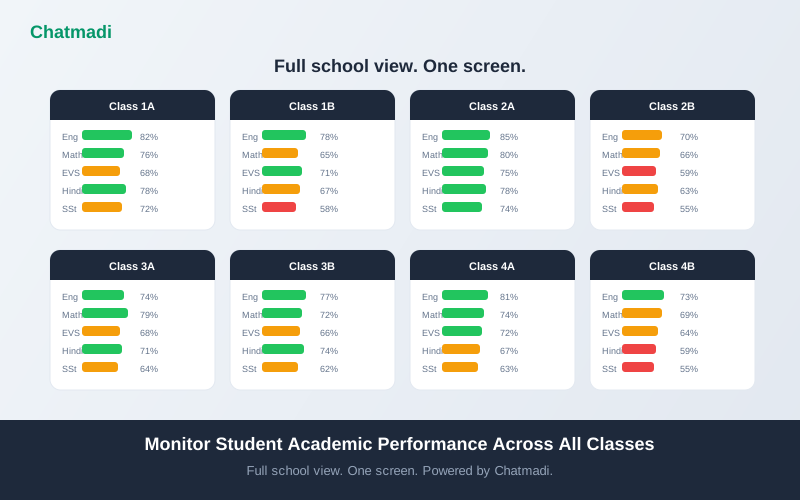
A principal of a school with 8 classes, 5 subjects per class, and 3 exams per term needs to process 120 data points per exam cycle just to understand the academic health of the school. In reality, most principals process almost none of these data points themselves. They rely on what teachers tell them in staff meetings, which is a filtered, summarised, and sometimes optimistic version of reality. A teacher who says "Class 4 did well in the maths test" may mean the class average was 65%, which might not be "well" by the principal's standards. Without access to the actual numbers, the principal cannot ask the right questions. Academic performance tracking school India principals need must provide a school-wide view that does not depend on teacher self-reporting. Chatmadi aggregates exam results across all classes and subjects into a single dashboard that gives principals unfiltered visibility into academic performance.
The Academic Blind Spots Every Indian School Principal Has
Principals of Indian schools operate with three persistent blind spots when it comes to academic performance. Blind spot one: subject-level performance across classes. The principal knows that Class 4A performed well in the midterm exam overall, but does not know that the class scored 82% in English and 48% in Mathematics. The overall average of 65% masked a serious subject-specific problem. Without subject-level data for every class, the principal cannot identify which subjects need intervention. Blind spot two: declining students. A student who scored 78% in the first unit test and 56% in the second unit test is on a declining trajectory. But the principal sees neither score. The teacher may or may not flag this decline, depending on how many students they are tracking and whether they consider a 22-point drop significant enough to escalate. Without automatic detection of declining trajectories, these students are invisible until they fail an exam or a parent complains. Blind spot three: teacher effectiveness. If Class 3A scores 75% in Mathematics and Class 3B scores 58% in the same subject with the same curriculum and similar student profiles, the difference is likely attributable to teaching quality. But the principal only sees this difference if they manually compare exam results across sections, which most principals do not have time to do. Each of these blind spots represents an opportunity for intervention that is missed because the data is not accessible in a usable format.
What School-Wide Academic Monitoring Actually Looks Like
Effective academic monitoring gives the principal three views. The bird's eye view shows every class and every subject in a single screen. Each class-subject combination is colour-coded: green for average scores above 70%, amber for 50 to 70%, and red for below 50%. This view takes less than 10 seconds to scan and immediately reveals where the problems are. If Class 4A Mathematics is red while all other Class 4A subjects are green, the principal knows exactly where to focus. The trend view shows how performance changes over time. Are scores improving, stable, or declining? A class that scored 72% in the first unit test and 65% in the second is on a concerning trajectory even though neither score individually would trigger an alarm. Trend data reveals the direction of change, which is often more important than the absolute score. The student-level view identifies individual students who are struggling across multiple subjects or who are declining significantly between exams. A student who drops 15 or more percentage points between consecutive exams needs attention regardless of whether their current score is above or below the passing threshold. Chatmadi provides all three views in its academic analytics module, automatically computed from exam results entered by teachers.
How Chatmadi Aggregates and Analyses Exam Performance Across Classes
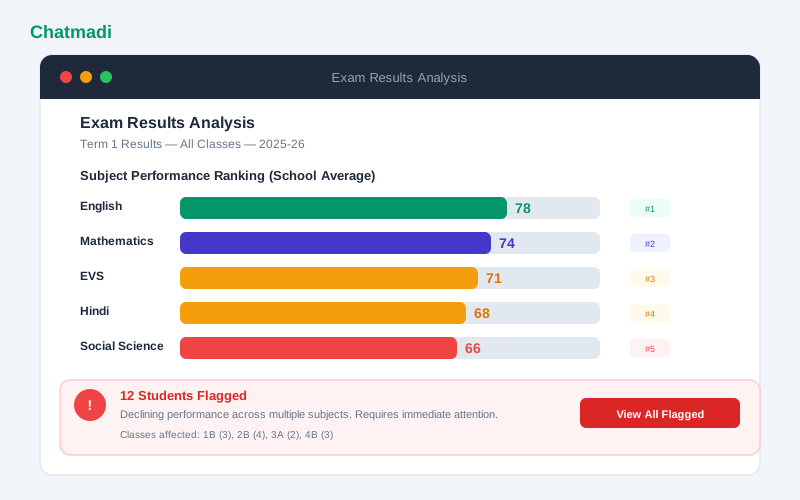
The aggregation process in Chatmadi starts with exam result entry. When teachers enter exam results for their class, the data flows into a central analytics engine. The engine computes multiple metrics automatically. Class averages by subject: for each class-subject combination, the system calculates the mean, median, highest, and lowest scores. These metrics reveal not just the average performance but the spread. A class with a mean of 70% and a range of 40% to 95% has a very different dynamic from a class with a mean of 70% and a range of 60% to 80%. Subject rankings: across all classes, subjects are ranked by average performance. This reveals school-wide subject strengths and weaknesses. If Mathematics consistently ranks lowest across all classes, the issue is likely curricular or methodological rather than class-specific. Declining student identification: the system compares each student's score in the current exam against their previous exam. Students whose scores have dropped by more than 10 percentage points are flagged on the principal's dashboard. The flag includes the student's name, class, subjects where decline is observed, and the magnitude of the decline. Cross-section comparison: for schools with multiple sections per grade, the system compares performance across sections studying the same curriculum. Significant differences between sections suggest variations in teaching effectiveness that the principal should investigate.
Exam results analysis showing subject performance ranking bar chart and 12 students flagged as declining
How-To: Setting Up Academic Performance Monitoring in Chatmadi
Setting up academic monitoring requires three steps. Step one: define your exam structure. In Chatmadi's settings, set up the exam types your school uses: unit tests, midterms, term exams, and any other assessment formats. For each exam type, specify the subjects and the maximum marks for each subject. Step two: enter exam results. After each exam, teachers enter the results for their class in Chatmadi. The entry interface is a simple spreadsheet-like grid with student names in rows and subjects in columns. Teachers enter the marks obtained. The system calculates percentages automatically. Step three: review the analytics. Once results are entered, the analytics dashboard updates immediately. The principal can view the bird's eye view (class-subject heat map), the trend view (performance over consecutive exams), and the student-level view (flagged declining students). For ongoing monitoring, establish a routine where teachers enter results within three days of each exam. The principal reviews the analytics within one week of each exam cycle. This creates a regular cadence of academic oversight that prevents problems from going undetected.
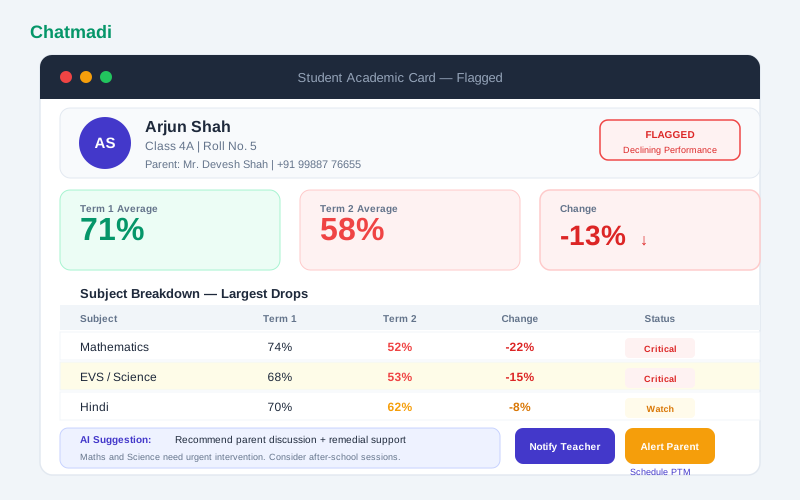
Student academic card for Arjun Shah showing term over term decline with subject breakdown and AI suggestions
Using Academic Data to Have Better Conversations with Teachers
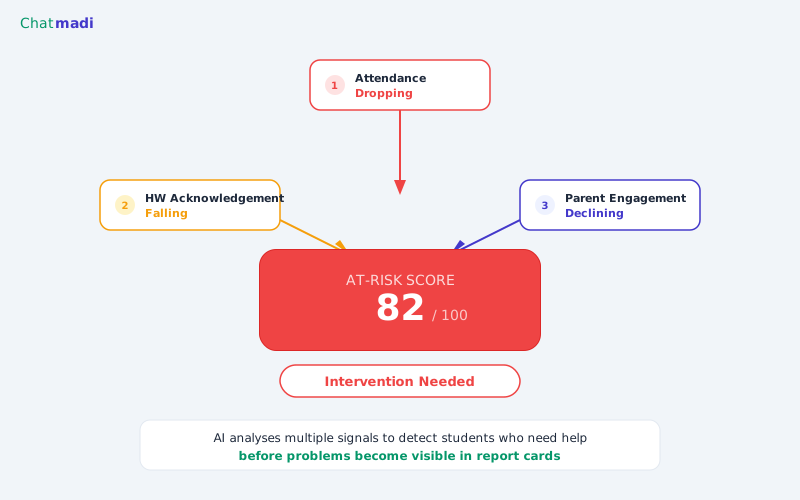
The most valuable application of academic analytics is not the dashboard itself but the conversations it enables. When a principal walks into a staff meeting with data, the conversation shifts from opinions to evidence. Instead of asking "How did your class do?" and receiving a subjective answer, the principal can say "I see that Class 3A's Mathematics average dropped from 72% to 61% between the first and second unit tests. What do you think is driving that decline?" This is not a confrontational question. It is an investigative one. The data has identified a pattern, and the principal and teacher can now collaborate on understanding the cause and finding a solution. Common causes include a difficult topic in the curriculum that needs more teaching time, a change in the student composition (new students joining who are behind), a teaching approach that is not connecting with the class, or external factors affecting the class during the exam period. For student-level conversations, the data enables equally specific discussions. "I notice that Arjun's scores have dropped across three subjects in the last exam cycle. His parent engagement score is also declining. Have you noticed anything in class?" This question connects academic data with engagement data to paint a complete picture. Chatmadi's AI even suggests possible interventions: "Recommend parent discussion and remedial support" for a student showing a consistent decline. These suggestions give teachers and principals a starting point for their conversation rather than leaving them to figure out the response from scratch.
Frequently Asked Questions
Can teachers enter exam results from their phone?
Yes. Chatmadi's dashboard is responsive and works on mobile browsers. Teachers can enter exam results from their phone, though a laptop or tablet provides a better experience for entering data across many students.
Does Chatmadi work with any grading system?
Chatmadi supports marks-based systems (scores out of a maximum), percentage-based systems, and grade-based systems (A, B, C). Schools can configure their grading scale in the settings.
Can I compare academic performance across academic years?
Yes. Chatmadi retains exam data across academic years. Principals can compare the current year's performance against previous years to track long-term trends.
How does Chatmadi identify declining students?
The system compares each student's performance in the current exam against their previous exam in the same subject. A drop of 10 or more percentage points triggers a flag. A drop across multiple subjects triggers a higher-priority flag.
Can subject teachers see the performance data for their subject across all classes?
Yes. Subject teachers can view a subject-specific dashboard that shows how their subject is performing across all classes they teach. This helps them identify class-specific issues and adjust their approach.
---
You cannot fix what you cannot see. Chatmadi gives you full visibility into academic performance across every class. Start free at chatmadi.com
Tagsacademic performance tracking school Indiaschool exam result tracking software Indiastudent performance tracking softwareschool data analytics IndiaChatmadi
C
Chatmadi Team
School Communication Intelligence
The Chatmadi team writes about AI-powered parent communication, school management best practices, and WhatsApp intelligence for Indian schools. Built by Eduloom Technologies OPC Pvt Ltd, Mysore.