How to Track Student Attendance via WhatsApp Without Calling Parents
In this article
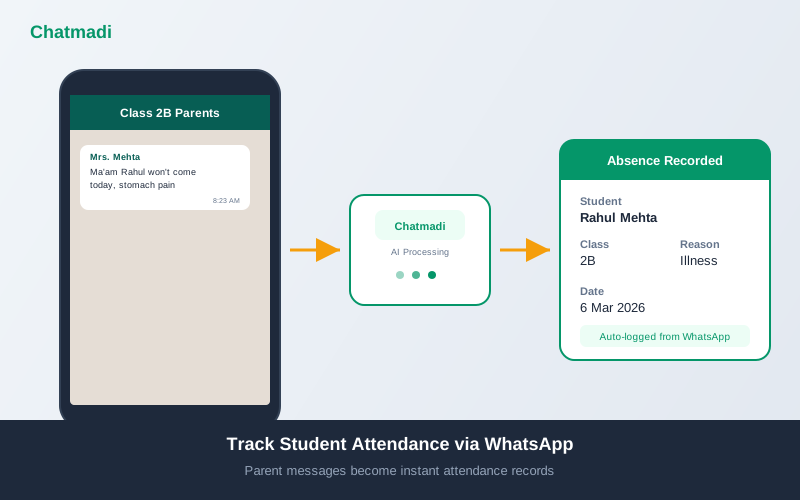
The daily attendance routine in an Indian school classroom follows a familiar pattern. The class teacher calls out names from the register. Students respond. The teacher marks present or absent in the register. For absent students, the teacher checks the WhatsApp group and private messages to see if a parent has sent a reason. If no message has been received, the teacher may call the parent to confirm. This process takes 15 to 20 minutes for a class of 30 students and another 10 to 15 minutes to follow up on unexplained absences. Multiply this across 8 classes and the school spends 2 to 3 hours of teacher time daily on attendance alone. Understanding how to track student attendance via WhatsApp changes this equation entirely. Parents already send absence notifications through WhatsApp. Chatmadi reads these messages, extracts the student name, date, and reason, and creates attendance records automatically.
How Indian Class Teachers Currently Track Attendance (The Problem)
The current attendance workflow in most Indian schools has three phases, each with its own inefficiency. Phase one: morning register. The teacher marks attendance manually in a physical register or a digital spreadsheet. This is the baseline record but it only tells you who is here and who is not. It does not tell you why a student is absent. Phase two: reason collection. After marking attendance, the teacher checks WhatsApp for parent messages explaining absences. Messages may have arrived at various times: some at 7 AM before school started, some at 8:30 AM during assembly, some as late as 10 AM. The teacher scrolls through the group chat and private messages, mentally matching each absence message to the register. Phase three: follow-up. For students marked absent without a parent message, the teacher either calls the parent or sends a WhatsApp message asking for the reason. Some parents respond quickly. Others respond hours later. Some do not respond at all. The teacher may need to follow up again the next day. The entire process is manual, sequential, and prone to errors. A teacher who receives 15 WhatsApp messages between 7 and 9 AM, only 3 of which are absence notifications, must identify and extract those 3 from among homework queries, fee questions, and general chatter. This is the problem that Chatmadi solves by treating every message as potential attendance data and extracting absence notifications automatically.
How Parents Already Send Attendance Information to Schools
Indian parents communicate student absences through WhatsApp using a remarkable variety of formats. Some send formal messages: "Dear Ma'am, Arjun will not be attending school today due to fever. Regards, Mrs. Sharma." Others send casual messages: "Ma'am Rahul stomach pain today, not coming." Others send voice notes explaining the absence. Others send a one-word message: "Leave" or "Absent." Some parents message the class group. Others message the teacher privately. Some send the message the night before. Others send it 30 minutes after school has started. Despite this variety, every message contains the same core information: which student, which day, and usually a reason. The challenge for teachers is that these messages are scattered across multiple conversations, arrive at different times, and use different formats. Extracting the information manually is tedious and error-prone. Chatmadi's natural language processing handles all of these variations. It recognises "Rahul won't come today, fever" and "Ma'am please grant Diya leave for tomorrow, we have a family wedding" and "Arjun ko bukhar hai, aaj nahi aayega" as absence notifications. It extracts the student name, matches it to the class roster, identifies the date (today, tomorrow, or a specific date if mentioned), and captures the reason.
How Chatmadi Converts Parent WhatsApp Messages into Attendance Records
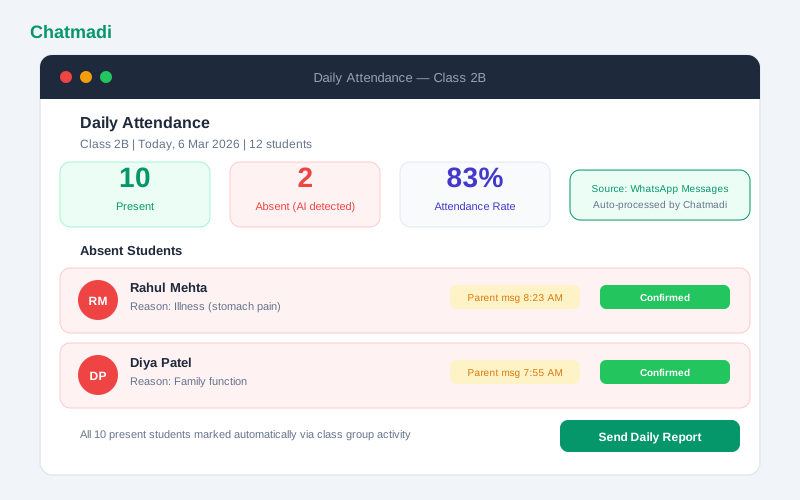
The conversion process happens in four steps. Step one: message scanning. When a WhatsApp conversation is uploaded to Chatmadi, the AI scans every message for absence-related content. It looks for keywords and phrases in English, Hindi, and Hinglish that indicate a student will not be attending school. Step two: entity extraction. From each identified absence message, the AI extracts four pieces of information: the student's name (matched against the class roster), the date of absence (today, tomorrow, or a specific date), the reason for absence (illness, family event, travel, appointment, or unspecified), and the sender (which parent sent the message). Step three: record creation. A student absence record is created in Chatmadi's database with all extracted information, linked to the student's profile. The record includes a timestamp of when the parent sent the message and when the AI processed it. Step four: dashboard update. The class teacher's attendance dashboard updates to reflect the new absence record. The student is marked as absent with the reason displayed alongside their name. The teacher can see at a glance who is absent, why, and when the parent notified the school. This entire process takes seconds and happens automatically each time a conversation is uploaded. The teacher's role shifts from data entry (scrolling through messages and manually recording absences) to data review (checking the dashboard and confirming the AI's records are accurate).
Daily attendance dashboard for Class 2B showing 10 present and 2 absent with AI detected reasons and timestamps
How-To: Automating Daily Attendance Tracking in Your School
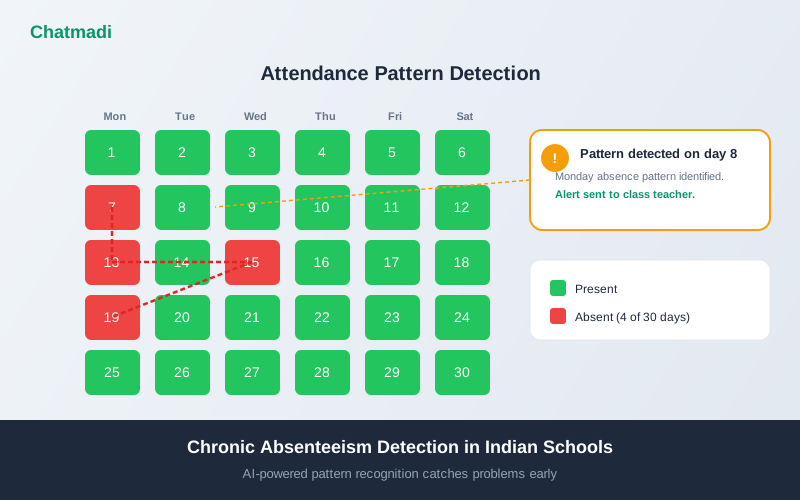
Implementing automated attendance tracking with Chatmadi requires a simple daily routine. Morning routine for the class teacher: after the first period, export the class WhatsApp group conversation and upload it to Chatmadi. If you uploaded yesterday's conversation, export only from yesterday evening to this morning. The AI will process the new messages and update the attendance dashboard. Review the dashboard. Confirm that the AI-detected absences match the students who are actually absent from class. If a student is absent but no parent message was received, mark them manually in the dashboard. The dashboard now shows a complete attendance picture for the day. For schools using the WhatsApp Business API integration, the upload step is eliminated. Messages flow into Chatmadi automatically in real time. The teacher simply opens the dashboard each morning to see the latest attendance status. Weekly review: at the end of each week, review the weekly attendance summary. Chatmadi shows the attendance rate for each student, highlights any emerging patterns, and flags students who have been absent more than twice in the week. Monthly review: the monthly attendance report provides a comprehensive view of attendance across the class. Use this report for parent communication, principal reporting, and identifying students who may need intervention.
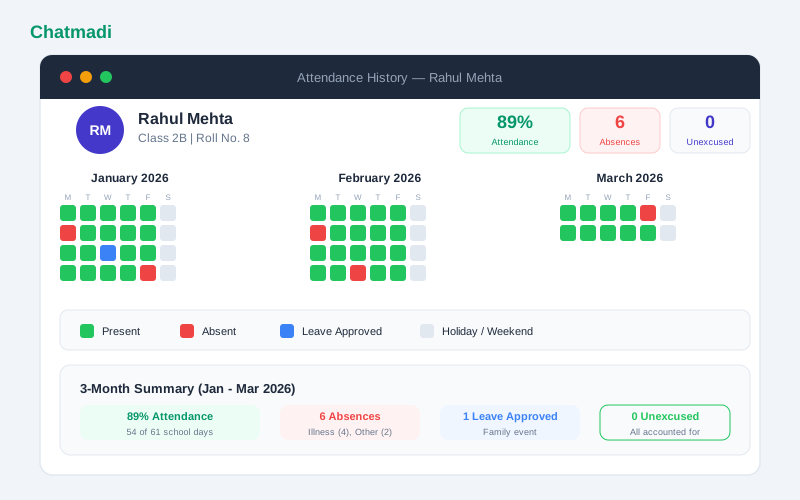
Three month attendance history calendar for one student with colour coded present absent and leave days
Building a Complete Attendance Picture from WhatsApp Data
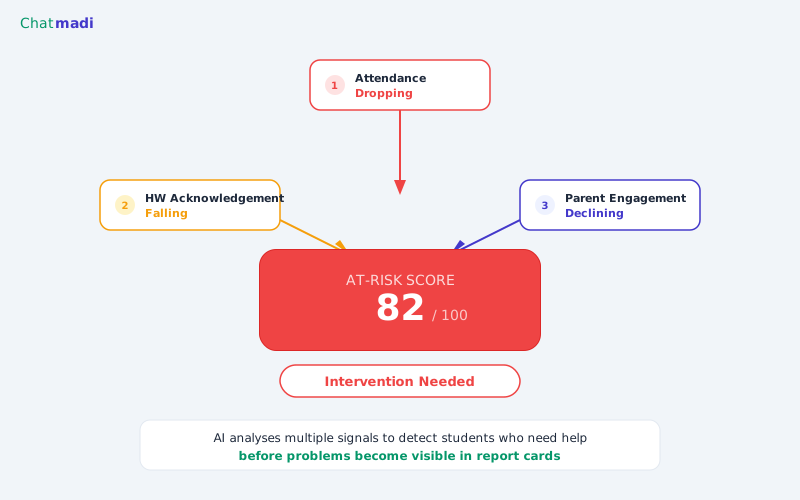
WhatsApp-based attendance tracking provides more than just present or absent data. It provides context that traditional registers miss. Reason analysis shows the most common reasons for absence in your class. If illness is the top reason, the school may need to review hygiene practices or check for seasonal patterns. If family functions are the top reason, the school is likely in a community where family events are prioritised, and the school can plan around known festival periods. Timing analysis shows when parents typically send absence messages. If most messages arrive after 9 AM, parents may be deciding at the last minute whether to send their child to school. If messages arrive the night before, parents are planning ahead. This timing data helps teachers know when to check for messages. Parent responsiveness shows which parents consistently notify the school about absences and which do not. Parents who never send absence notifications may need a reminder about the school's communication expectations, or they may not be comfortable messaging the teacher and need an alternative channel. Over time, Chatmadi builds a comprehensive attendance profile for each student that includes total attendance rate, absence patterns by day of week, most common absence reasons, parent notification behaviour, and trend data showing whether attendance is improving or declining. This profile feeds into the student's overall record and the parent engagement score, creating a holistic view of each family's connection to the school.
Frequently Asked Questions
Can Chatmadi replace the school's official attendance register?
Chatmadi complements the official register by automating data collection and analysis. Schools should maintain their official registers as required by their board or regulatory body. Chatmadi's data can be used to populate the official register more accurately and efficiently.
What if a parent sends an absence message for the wrong date?
The AI uses contextual clues to determine the intended date. "Tomorrow leave" is interpreted as the next school day. "Today not coming" is the current day. If the date is ambiguous, the system flags it for teacher confirmation.
Does Chatmadi track late arrivals as well as absences?
Late arrival tracking requires real-time data such as a gate entry system. Chatmadi focuses on absence detection from parent messages. A parent who says "Arjun will be late today, doctor appointment in the morning" is logged as a late arrival rather than an absence.
How accurate is the AI at detecting absence messages?
In testing across thousands of parent messages, Chatmadi's absence detection accuracy exceeds 95%. The remaining 5% includes ambiguous messages that the system flags for teacher review rather than processing automatically.
Can the attendance data be exported for board reporting?
Yes. Chatmadi's attendance data can be exported in CSV format for integration with the school's official reporting systems.
---
Your parents are already telling you who is absent on WhatsApp. Chatmadi turns those messages into structured attendance records. Start free at chatmadi.com
Tagshow to track student attendance via WhatsAppAI attendance tracking school Indiastudent absence pattern detection softwareschool attendance management software IndiaChatmadi
C
Chatmadi Team
School Communication Intelligence
The Chatmadi team writes about AI-powered parent communication, school management best practices, and WhatsApp intelligence for Indian schools. Built by Eduloom Technologies OPC Pvt Ltd, Mysore.