WhatsApp Group Management for Class Teachers: From Chaos to Clarity
In this article
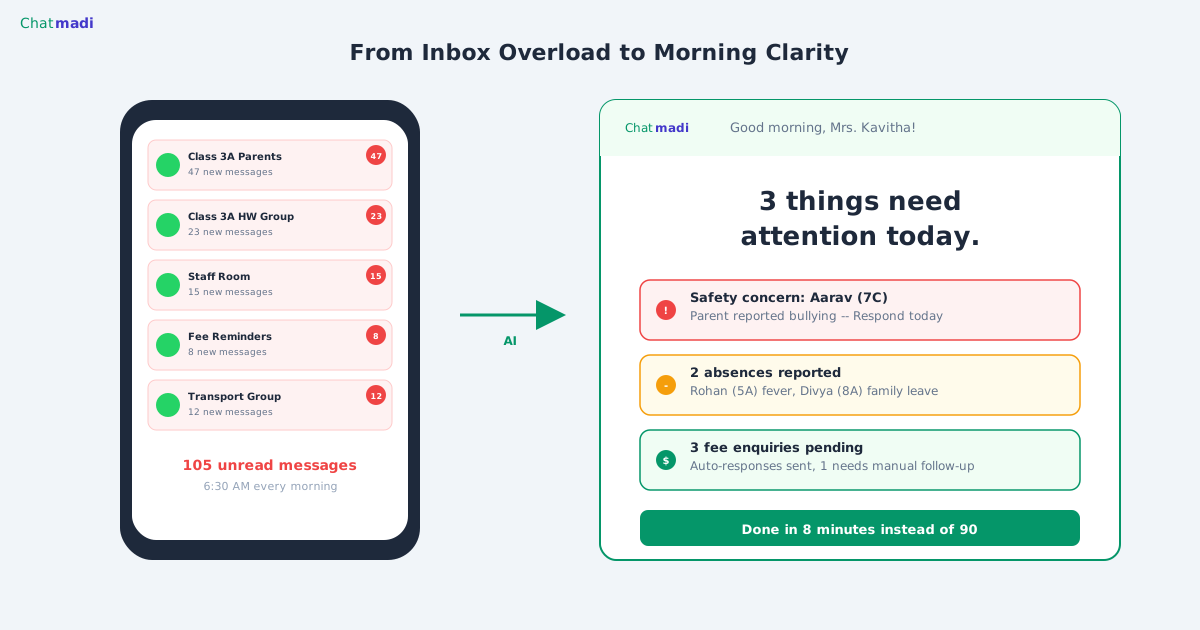
This article is written for you, the class teacher. Not for your principal, not for your admin, not for a product manager. For you, the person who opens WhatsApp at 7:00 AM and finds 67 messages across three parent groups, knowing that somewhere in those 67 messages is one absence notification, one fee payment confirmation, and possibly a welfare concern that needs your attention today. WhatsApp group management for school teachers is not about reading faster. It is about reading smarter. And the smartest approach is to let AI read everything and tell you only what matters.
A Class Teacher's WhatsApp Day: The Hidden 2-Hour Burden
Let us be specific about the daily reality. Mrs. Kavitha Reddy teaches Class 3A at a school in Chennai. She has 11 students, which means 11 families, roughly 18 to 22 parent contacts across mothers, fathers, and guardians. She manages a class parent group (22 members), participates in the school broadcast group (120 members), and monitors a class homework group (22 members). On a typical weekday, these three groups collectively generate 60 to 100 messages. Of those messages, approximately 5 to 8 require Mrs. Reddy's attention or action. The rest are acknowledgements ("OK ma'am"), greetings, forwarded content, and conversations between parents that do not involve her. But she cannot know which messages are the critical 5 to 8 without scanning all 100. This scanning takes between 45 minutes and 2 hours per day depending on message volume, time of year, and how many parents have queries. That is 2 hours of a class teacher's day spent on communication monitoring, not teaching, not lesson planning, not grading. This is the hidden burden that WhatsApp group management for school teachers creates.
The 5 Types of Messages That Actually Need Your Attention
Not all parent messages are equal. Through analysis of thousands of school WhatsApp conversations, five categories consistently emerge as requiring teacher attention or action. First: absence and attendance notifications. A parent reporting their child absent needs the information recorded and acknowledged. Second: fee payment confirmations. A parent who mentions paying fees via UPI or cash needs that information routed to the accounts team. Third: safety and welfare concerns. Any mention of bullying, emotional distress, or concerning behaviour requires same-day attention. Fourth: academic queries requiring a response. Questions about homework, exam schedule, or academic performance that only the class teacher can answer. Fifth: PTM and event confirmations. RSVPs that need to be tracked for planning purposes. Everything else, the good morning messages, the thank you replies, the forwarded content, the parent-to-parent conversations, does not require your attention. The challenge with WhatsApp is that these five types are scattered randomly among dozens of irrelevant messages with no way to filter them.
How Chatmadi's Teacher Dashboard Filters What Matters
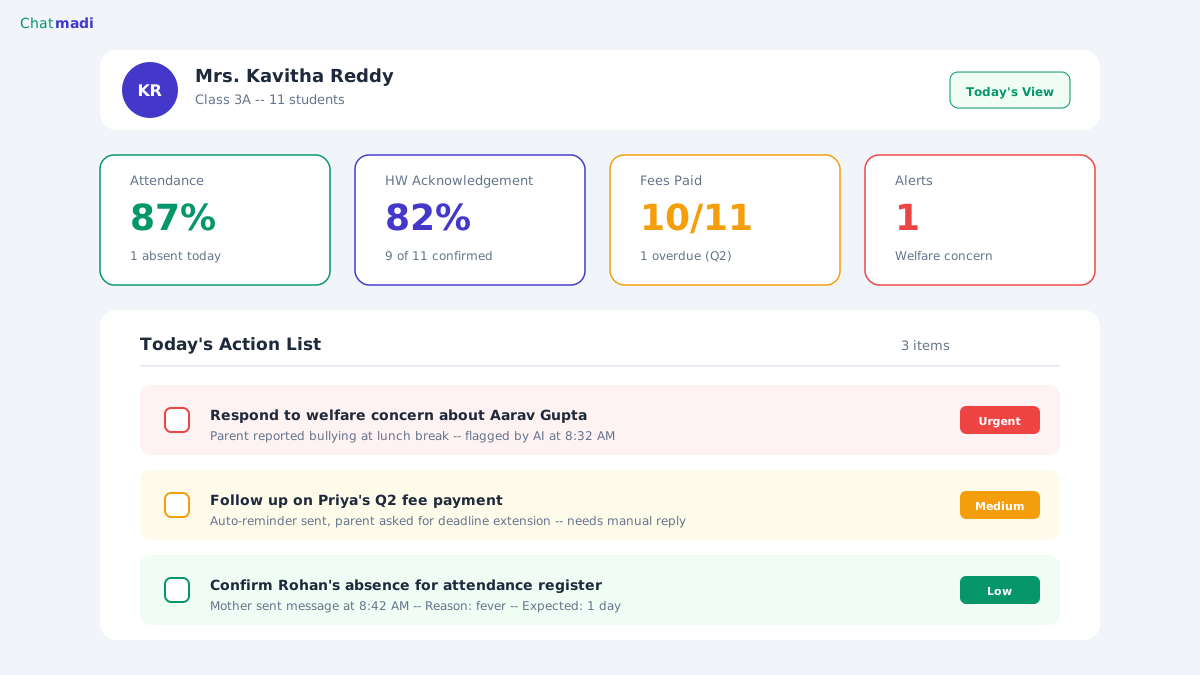
Chatmadi solves this filtering problem through AI analysis and a purpose-built teacher dashboard. When you upload your WhatsApp conversations to Chatmadi, the AI reads every message and identifies which ones fall into the five categories described above. Your dashboard then shows you a clean, prioritised list of items needing attention. Today's absences are listed with student names and reasons. Fee payment detections are flagged for confirmation. Any safety concerns are highlighted in red at the top of your dashboard. Academic queries are listed for your response. PTM confirmations are counted. Instead of scrolling through 100 messages to find the 5 that matter, you review a dashboard with exactly those 5 items. Chatmadi does not ask you to type data into forms. It does not create additional work. It reads the messages you are already receiving and presents them in a format that takes 10 to 15 minutes to review instead of 2 hours. The dashboard is scoped to your class only. You see Class 3A. You do not see Class 4B. Your principal sees all classes, but you see only yours.
Chatmadi class teacher dashboard for Mrs Kavitha Reddy showing metrics and action list
How-To: A Daily WhatsApp Routine for Class Teachers Using Chatmadi
Here is the daily routine that teachers using Chatmadi report works best. Morning (before first period): export your parent group conversations from WhatsApp. This takes 10 seconds per group. Upload the exports to Chatmadi via Bulk Upload. Review your dashboard: confirm any absences, note fee detections, check for safety flags. Total time: 10 to 15 minutes. Mid-day (during a free period): check if any new urgent items have been flagged from conversations uploaded by other staff or received via API. Respond to academic queries that appeared in the morning review. Total time: 5 minutes. End of day (before leaving): do a final dashboard check. Confirm that all morning items have been addressed. Note any items that carry over to tomorrow. Total time: 5 minutes. Total daily WhatsApp management time with Chatmadi: 20 to 25 minutes. Compare this to the 60 to 120 minutes previously spent scrolling through groups. The time saved is not hypothetical. It is time that goes back to lesson planning, student interaction, and personal wellbeing.
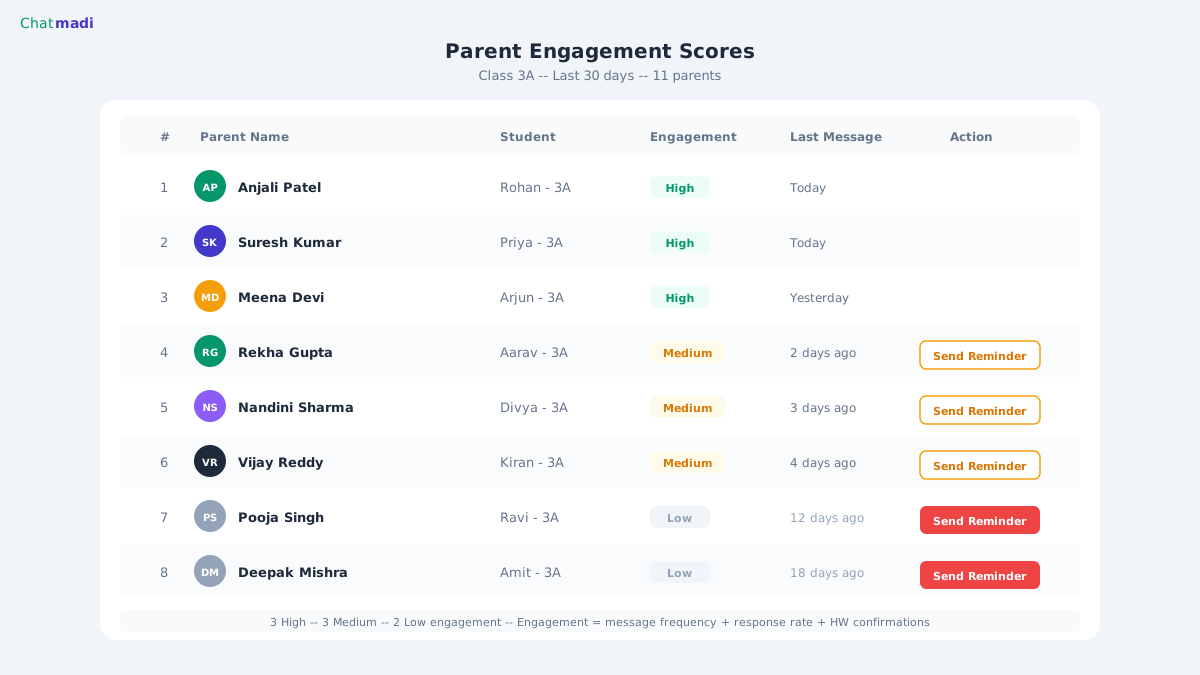
Chatmadi parent engagement scores showing ranked list with activity badges
What Happens to Teacher Wellbeing When WhatsApp Stress Drops
This section may seem unusual for a technology article, but it matters deeply. Class teachers in Indian schools report that WhatsApp group management is one of their top three sources of daily stress. The constant stream of notifications creates a state of perpetual alertness. Teachers check their phones during meals, during commute, and before bed. The anxiety that they might have missed an important message is always present. When schools implement Chatmadi, teachers report a measurable reduction in this WhatsApp anxiety. The knowledge that the AI has read everything and will surface anything critical allows teachers to disconnect from their parent groups outside school hours. Instead of checking WhatsApp 15 times a day, they check the Chatmadi dashboard twice: morning and afternoon. The mental load of tracking dozens of conversations in their head is replaced by a clean, structured dashboard that shows exactly what needs attention. Several teachers have described the shift as going from "being on call for WhatsApp" to "checking a report in the morning." For school leaders considering Chatmadi, this wellbeing benefit should not be underestimated. A teacher who is not spending their evenings worrying about missed WhatsApp messages is a teacher who comes to school the next morning with more energy for their students. WhatsApp group management for school teachers is fundamentally a wellbeing issue, not just a productivity issue.
Frequently Asked Questions
Does Chatmadi require me to stop using WhatsApp?
No. You continue using WhatsApp exactly as before. The only new action is exporting your conversations once per day (10 seconds) and uploading them to Chatmadi. You still respond to parents on WhatsApp unless your school has the API inbox enabled.
Can I see which parents are most engaged in WhatsApp communication?
Yes. Chatmadi tracks parent engagement metrics including message frequency, homework acknowledgement rate, PTM RSVP response, and fee communication. Your dashboard shows engagement levels per parent, helping you identify families that may need outreach.
What if my school only has a few classes?
Chatmadi works for schools of all sizes. The Starter plan supports 1 class with up to 30 students for free. Even a single class teacher managing one parent group will benefit from AI-powered signal extraction and the organised dashboard view.
Can I use Chatmadi on my phone or only on a computer?
Chatmadi works in any web browser on any device, phone, tablet, or computer. Most teachers use it on their phone browser during the morning upload routine and on a computer during school hours for dashboard review.
Does the principal see my dashboard?
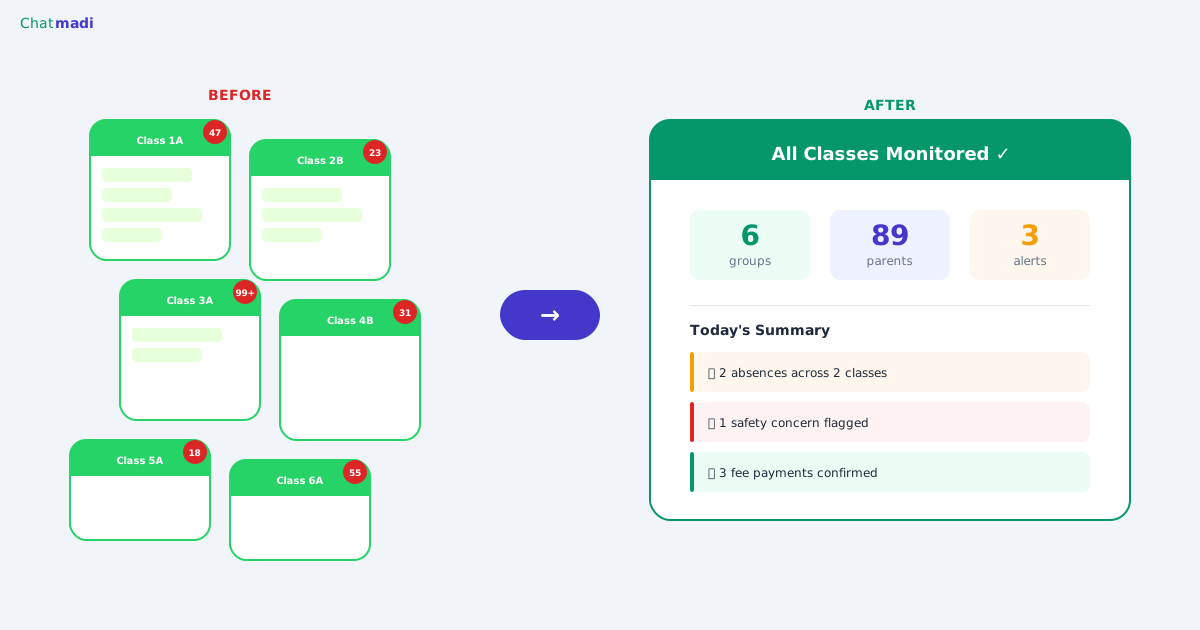
The principal sees a school-wide dashboard that aggregates data from all classes. They can see summary metrics for your class (attendance percentage, alert count) but the detailed conversation-level view is your primary workspace.
---
Your students need your attention more than your WhatsApp groups do. Let Chatmadi handle the reading. Start free at chatmadi.com
TagsWhatsApp group management teachersclass teacher dashboardteacher workload reductionschool parent communicationChatmadi
C
Chatmadi Team
School Communication Intelligence
The Chatmadi team writes about AI-powered parent communication, school management best practices, and WhatsApp intelligence for Indian schools. Built by Eduloom Technologies OPC Pvt Ltd, Mysore.